Using iText to build PDF on the fly

Although there are many solutions (such as XML-FOP) to generate PDF on the fly, iText is a good choice to read PDF template and bind data dynamically.

1) For PDF form where data fields have fixed length, it is quite easy to use iText (I use C# version iTextSharp here) to bind data to PDF Text Field:

// Read PDF template
iTextSharp.text.pdf.PdfReader pdfRd = new iTextSharp.text.pdf.PdfReader(Server.MapPath("~/SampleJS.pdf"));
iTextSharp.text.pdf.PdfStamper stamp = new iTextSharp.text.pdf.PdfStamper(pdfRd, outputStream);

// Set form Text Fields
iTextSharp.text.pdf.AcroFields fields = stamp.AcroFields;
fields.SetField("formText", value);

// Close stamp
stamp.Close();

2) For free text data, you cannot put PDF Text Field to show data. For example, if you want to bind data to this template:

"Welcome to «Institution»! Please send mail to «Person» before «Date»"

You cannot use PDF Text Field because Text Field has fixed length. If «Institution» value is short, there will be extra blank space in the statement.

So what can you do? You can put the template statement into one Text Field with “Read Only” permission. Then you can replace the string with data like below:

// Get Text Fields from PDF file
iTextSharp.text.pdf.AcroFields fields = stamp.AcroFields;

// Get template
string formText = fields.GetField("formText");

// Replace template with data
formText = formText.Replace("«Institution»", txtInstitution);
formText = formText.Replace("«Person»", txtPerson);
formText = formText.Replace("«Date»", date);

// Set back the Text Field
fields.SetField("formText", formText);

3) How to insert image? PDF Text Field can be a placeholder for image. For example, to add a logo image to a placeholder:

// Get content to make changes
PdfContentByte overContent = stamp.GetOverContent(1);

// Get logo image
iTextSharp.text.Image logo = iTextSharp.text.Image.GetInstance(Server.MapPath("~/logo.jpg"));

// Get logo placeholder position
float[] logoArea = fields.GetFieldPositions("Logo");

// Get logo rectangle
iTextSharp.text.Rectangle logoRect = new Rectangle(logoArea[1], logoArea[2], logoArea[3], logoArea[4]);

// Set logo position in the placeholder (right alignment)
logo.ScaleToFit(logoRect.Width, logoRect.Height);
logo.SetAbsolutePosition(logoArea[3] - logo.ScaledWidth + (logoRect.Width - logo.ScaledWidth) / 2, logoArea[2] + (logoRect.Height - logo.ScaledHeight) / 2);

// Add image
overContent.AddImage(logo);

4) How to add a barcode? Barcode is similar to image:

// Get content to make changes
PdfContentByte overContent = stamp.GetOverContent(1);

// Create a barcode
Barcode39 code39 = new Barcode39();
// Assign barcode value
code39.Code = barcodeValue;
code39.StartStopText = false;

// Create image from the barcode
iTextSharp.text.Image image39 = code39.CreateImageWithBarcode(overContent, null, null);

// Get barcode image placeholder
float[] barcodeArea = fields.GetFieldPositions("AppIDBarCode");
iTextSharp.text.Rectangle rect = new Rectangle(barcodeArea[1], barcodeArea[2], barcodeArea[3], barcodeArea[4]);
image39.ScaleToFit(rect.Width, rect.Height);
image39.SetAbsolutePosition(barcodeArea[1] + (rect.Width - image39.ScaledWidth) / 2, barcodeArea[2] + (rect.Height - image39.ScaledHeight) / 2);

// Add barcode image
overContent.AddImage(image39);

I still have several issues to solve, such as how to put rich text into Text Field. But for now, I have a good start for PDF generation. :)

Relax with Taiji -- for programmers like me

I went to doctor's office this morning and saw a poster to prevent heart disease. It says right things like low-fat diet, no smoking, no alcohol, and regular exercise (with a gym picture). But one important point is missed -- Relax. :)

Everybody has experience of blood pressure difference when he/she is in anger and in sleep. Emotion is a big factor for health, so calm your body and mind down, and relax...

Who does not know how to relax?! "I can lie down on sofa and watch TV" ... Is that a good way to relax after sitting in front of computer for a whole day?

One old phrase says "People's leg gets old first". I am not so old, but my sensitive body is verifying it: After a whole day tiring computer work and when I use eyes to look at computer or TV at night, sometimes I even feel my eyes poll energy from feet to upper body! Our brain and eyes are consuming most of our energy everyday.

So to get heath back, we should:

1) Calm down eyes (no computer or TV) and mind (no work at home)
2) Exercise in slow motion to build energy
3) Let energy go down to get legs stronger

Those are some important values of Taiji to programmers.

If you have no chance to learn Taiji with a good teacher, you can relax by yourself: Stand still and calm your body down (for half an hour). You should feel your feet are heavy and your upper body is light -- that is also Taiji. :) Your feet are heavy because your body is relaxed and energy goes down. Gradually, your feet and legs will become stronger and healthier.

To Generate PDF on the fly

PDF is a standard format for B2B or B2C process these days. I think you may have tried to download bank statement in PDF format. On web sites, the PDF documents are generated on demand. They are not generated and saved somewhere ahead.

I am doing research on how to generate PDF on the fly. I tried some products on market, but I have not found any software that can do the job for me.

This is my requirement: I have some Word template documents with merge fields that can be used to bind database data to generate real documents.
  • I already have a back-end system to generate those Word documents and convert to PDF format to print
  • The front-end system also wants to generate PDF documents on the fly when user clicks a "Get PDF" button on web page
It is too slow to convert Word document to PDF format. For some relatively large document, it may take minutes to finish. This process can be used in back-end system asynchronously, but it is not for web site.

For web site, I have to use PDF forms with form fields to bind database data. I can use PDF editor software to add form fields. But if I create both Word templates and PDF forms, it is hard to maintain both versions.

Is there a software to convert Word templates to PDF forms and to convert Word merge fields to PDF form fields? I tried Adlib, Adobe, ActivePDf, even OpenOffice. Unfortunately, none of them can do merge field conversion.

Why did we use Word template in the beginning? Because Word is better than PDF editor in formatting, and also people are familiar with Word than PDf editor too.

So, it seems I have to create and maintain both Word template (for back-end system) and PDF form (for front-end system) versions. :(

Biztalk Server 2006 and Windows Workflow Foundation: Better Together

This is a short note from last night's MICUG meeting about Biztalk and WF.

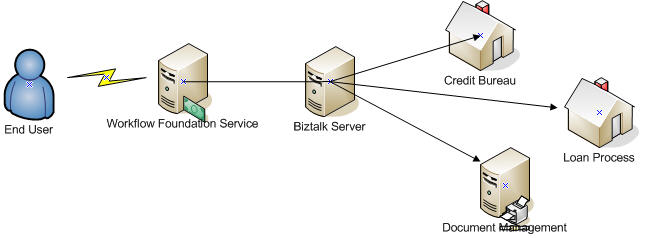
A typical system is like below:

Customers -- Processes -- Services -- Data Library -- Database

It is relatively easy to create Database, Data Library, Service programs, and Business Process Programs.

Developer can use
  • Biztalk to model business process across heterogeneous applications
  • Windows Workflow Foundation (WF) to model business processes involving human intervention

But:
  • How should I manage or control the state of a business process involving systems and people?
  • How do I allow business users to modify the business process on demand?

Biztalk 2006 does not allow to modify process on demand. Business users have to ask developer to change, compile and deploy new orchestration assembly. But WF allows to change or create workflow on demand.

Biztalk is not designed for user intervention either, while WF has sequential and stateful workflow to support user intervention.

So we can combine Biztalk and WF together to make everybody happy in two ways:
1. WF accesses Biztalk

This is a common design. WF deals with user interaction to fill in forms, then WF sends request to Biztalk to complete process across other systems.

2. Biztalk accesses WF services

In this design, Biztalk sends Web Service request to WF service for business users intervention. Also business users can access WF program to get Biztalk statistics through Biztalk BAM.

Although Biztalk R2 will build WF engine inside, the above two kinds of integration will still be reasonable.

A difference between OO method call and web service method call

Nowadays, .NET framework is making web service call similar to local method call to developers. There is no much learning curve to write integrated/distributed software using web service.

Traditionally when we develop OO software, we can define base class in API and call that API by passing subclass object. The benefit of this design is that we can use a single API to process multiple subclasses, which is easy and reasonable.

How about the API for Web Service method then? Can we follow the same style (ie. passing subclass object to the API) to define base class in API?

Unfortunately, no!

For example: There is a web method HelloWorld() like below

public class BaseClass
{
public string Name = "Base Class";
}

public class SubClass : BaseClass
{
public string Type = "Sub class";
}

[WebMethod]
public string HelloWorld(BaseClass oClass)
{
return "Hello " + oClass.Name;
}

1. If client gets web service definition through WSDL, it cannot get definition of SubClass. So it has no way to create a SubClass object to call HelloWorld()

2. If client shares BaseClass and SubClass library with web service, then the client can create a SubClass object (oSubClass). But the client can not call HelloWorld(oSubClass) that generated by WSDL either, because WSDL does not have any information for SubClass, not to mention the relationship between SubClass and BaseClass

3. If client shares BaseClass and SubClass library with web service, and call System.Web.Services.Protocols.SoapHttpClientProtocol.Invoke() directly:

Invoke("HelloClass", new object[] {oSubClass});

That still can not work: XmlSerializer will throw exception because we are passing an incompatible object.

So when we design the interface of web service, we have to define APIs separately for each kind of subclass!

ASP.NET TreeView shows old datasource

I do not know what's wrong in my code: The TreeView always shows the old data source, although I assign a new data source to it.

My purpose: To show XML in a tree view. Each leaf element is in "element_name = element_value" format:

name
|
+-- first = F1
|
+-- last = L1

Here is a sample code:

Add a TreeView control to Default.aspx:

<asp:TreeView ID="xmlTreeView" runat="server"
OnTreeNodeDataBound="XmlTreeView_OnTreeNodeDataBound"
ShowLines="True" EnableViewState="False">

In code behind:

public partial class _Default : System.Web.UI.Page
{
List<string> xmlStrList = new List<string>();

protected void Page_Load(object sender, EventArgs e)
{
// Initiate XML data
xmlStrList.Add("<name><first>F1</first><last>L1</last></name>");
xmlStrList.Add("<name><first>F2</first><last>L2</last></name>");
xmlStrList.Add("<name><first>F3</first><last>L3</last></name>");
xmlStrList.Add("<name><first>F4</first><last>L4</last></name>");

// Get random XML string
int i = DateTime.Now.Second % xmlStrList.Count;

// Create XmlDataSource
XmlDataSource dataSource = new XmlDataSource();
dataSource.Data = xmlStrList[i];

// Bind XMLDataSource to tree view
xmlTreeView.DataSource = dataSource;
xmlTreeView.DataBind();
}

// To show leaf element in "element_name = element_value" format
protected virtual void XmlTreeView_OnTreeNodeDataBound(Object sender, TreeNodeEventArgs e)
{
if (e.Node.DataItem is XmlElement)
{
XmlElement element = (XmlElement)e.Node.DataItem;
if (!element.FirstChild.HasChildNodes)
{
e.Node.Text = e.Node.Text + " = " + element.InnerText;
}
}
}
}

Everytime when I refresh the page, I get different XML string data source, but I see the SAME tree view data in browser! --- That is weird ...

I don't know why?

[Update] Copied from asp.net forum:
------------------------------------
This looks like a bug in the XmlDataSource control where modifying the Data property does not invalidate the cache. Setting EnableCaching=false is the workaround to use here.

Thanks,

Eilon
------------------------------------

XmlSerializers.dll?

After I generated web service proxy using WSDL file and ran my web service client, I noticed this log:"Resolver failed to load assembly 'myAssembly.XmlSerializers.dll'". What is that?

I did not use any XmlSerializers DLL reference, or even did not know its existence until I saw XML Serializer Generator Tool:

The XML Serializer Generator creates an XML serialization assembly for types in a specified assembly in order to improve the startup performance of a XmlSerializer when it serializes or deserializes objects of the specified types.

Anyway, I added this line to "Post-build event" in Visual Studio project to generate myAssembly.XmlSerializers.dll dynamically:

"C:\Program Files\Microsoft Visual Studio 8\SDK\v2.0\Bin\sgen" "$(TargetPath)"

propertySpecified in XML Serialization

What will be saved when an object of SomeDate class is serialized?

public class SomeDate
{
private short yearField;
private bool yearFieldSpecified;

public short Year
{
get
{
return this.yearField;
}
set
{
this.yearField = value;
}
}

[System.Xml.Serialization.XmlIgnoreAttribute()]
public bool YearSpecified
{
get
{
return this.yearFieldSpecified;
}
set
{
this.yearFieldSpecified = value;
}
}
}

The serialization code is:

private static void InitializeDateFile()
{
SomeDate oDate = new SomeDate();
oDate.Year = 1910;
oDate.YearSpecified = true;

XmlSerializer xmlSer =
new XmlSerializer(typeof(SomeDate));
XmlTextWriter writer =
new XmlTextWriter(@"SomeDate.xml",
Encoding.Default);
writer.Formatting = Formatting.Indented;
xmlSer.Serialize(writer, oDate);
writer.Close();
}

With oDate.YearSpecified = true;, the output is:

<SomeDate xmlns:xsi="http://www.w3.org/2001/XMLSchema-instance"
xmlns:xsd="http://www.w3.org/2001/XMLSchema">
<Year>1910</Year>
</SomeDate>

But without oDate.YearSpecified = true;, the output becomes:

<SomeDate xmlns:xsi="http://www.w3.org/2001/XMLSchema-instance"
xmlns:xsd="http://www.w3.org/2001/XMLSchema" />

Where is Year element?

Here I found the reason:

The XML Schema Definition Tool (Xsd.exe) occasionally generates the XmlIgnoreAttribute when creating classes from a schema file (.xsd). This behavior occurs because value types cannot be set to a null reference (Nothing in Visual Basic), but all XML data types can be. Therefore, the tool creates two fields when it encounters an XML type that maps to a value type: one to hold the value, and another, special field that takes the form of fieldnameSpecified, where the fieldname is replaced by the name of the field or property. Notice, however, that this special field is generated only when the schema specifies that the element need not occur (minOccurs = "0") and that the element has no default value. The XmlSerializer sets and checks this special field to determine whether a value has been set for the field or property. Because the special field must not be serialized, the tool applies the XmlIgnoreAttribute to it.

Good Videos (Taiji)

Although I have practiced Chen-style Taiji for several years, I did not learn Taiji Push-Hand.

From last month, I began to learn Push-Hand with Yang-style Taiji teachers. Their teaching also changed my feeling that Yang-style Taiji is eaiser than Chen-style. With good teachers around, I am confident that I can improve my health and Taiji skills from now on. :)

There are some good videos about Chen-style and Yang-style Taiji here. I save the link in this post for my later reference.

DateTime serialization in .NET 1.1 and 2.0

When a system is running in different time zones, we need pay attention to DateTime field, because .NET 2.0 web service is not compatible with .NET 1.1 web service in design for DateTime field.

.NET 2.0 DateTime uses two-bit flag to indicate time zone: Local, UTC, or unspecified (default)..NET 1.1 does not use that flag.

.NET 2.0 serializes DateTime with time zone information for “Local” and “UTC” DateTime object. There is no time zone for “Unspecified” DateTime object. By default, .NET program uses “Unspecified” DateTime value as local time. In distributed system across time zones, this may bring troubles.

.NET 1.1 always serializes DateTime with time zone.

Below is an example tested in our project:
--------------------------------------------------

public class DateTimeSample
{
private System.DateTime m_dtDateTime =
DateTime.Parse("08/10/1971");

public System.DateTime LocalTime
{
get
{
return m_dtDateTime.ToLocalTime();
}
}

public System.DateTime Default
{
get
{
return m_dtDateTime;
}
}

public System.DateTime UniversalTime
{
get
{
return m_dtDateTime.ToUniversalTime();
}
}
}

.Net 1.1 serialization:

<?xml version="1.0" encoding="utf-16"?>
<DateTimeSample xmlns:xsd="http://www.w3.org/2001/XMLSchema"
xmlns:xsi="http://www.w3.org/2001/XMLSchema-instance">
<LocalTime>1971-08-10T20:00:00.0000000-04:00</LocalTime>
<Default>1971-08-11T00:00:00.0000000-04:00</Default>
<UniversalTime>1971-08-11T04:00:00.0000000-04:00</UniversalTime>
</DateTimeSample>

.Net 2.0 serialization:

<?xml version="1.0" encoding="utf-16"?>
<DateTimeSample xmlns:xsi="http://www.w3.org/2001/XMLSchema-instance"
xmlns:xsd="http://www.w3.org/2001/XMLSchema">
<LocalTime>1971-08-10T20:00:00-04:00</LocalTime>
<Default>1971-08-11T00:00:00</Default>
<UniversalTime>1971-08-11T04:00:00Z</UniversalTime>
</DateTimeSample>

When a system becomes distributed …

When we build a system, normally we design a simple framework at first. Then we will add more features to it. When the system is growing bigger and distributed, you will find some weird and interesting bugs.

One example is about date time. When a system was designed at the beginning, the developers decided to use local time to save all the time fields, including “date of birth”. When the program was running locally, there was no problem. But when a call center using Windows Forms application became part of the system, a weird bug arose: some clients’ date of birth had one day difference between sub systems (e.g. 08/18/1966 in one database, but 08/19/1966 in another database). Because of wrong DOB, the clients could not pass credit check.

I spent the whole afternoon and evening yesterday to check code and logs, but I didn’t find any reason. Then before I went bed last night, suddenly I realized the bug was caused by time zone difference in computers.

For example, the business layer server is in “-5” time zone, but a Call Center agent’s computer is set to time zone “-4”. When the agent inputs DOB “08/18/1966”, the Call Center Windows Forms program will pass that date (“08/18/1966 00:00:00”) in local time format to business layer server. Because of time zone difference, the server will receive “08/17/1966 23:00:00” instead – one day difference occurs.

Some computers may have random time zone settings. The DOB field becomes messy.

A quick, temporary, logically (not physically) simple solution: to make all machines in same time zone. For the long term solution, the system should change to use UTC, not local time. That will require longer time to change database and code.

State Machine Workflow: Screencast

Although there are many webcasts or articles about MS Workflow Foundation, it is hard to find good stuff about state machine workflow. So when I found this good introduction of state machine workflow, I was quite happy to watch it several times. :)

Load Balancer and System.Net Connection Management

When you make first HttpWebRequest from you application to access a web site or web service, you will use this code:

WebRequest request = WebRequest.Create(url);
WebResponse response = request.GetResponse();


The process of creating a connection with remote application is complex. In order to improve connection speed for later web requests, .NET framework creates a connection pool for each URL. When a web response comes back, the connection is still available for other web requests with the same URL.

By default, the connection’s KeepAlive attribute is true. But the connection can not stay forever, of course. In .NET 2.0, you can define MaxIdleTime -- when the connection has been idle for more than MaxIdleTime, the connection will be closed by framework.

The logic looks good so far. But when a load balancer is involved, a problem may arise. Load balancer directs a request to a Web service and creates connection for the request. If the connection is idle for a period, the load balancer will break the connection without sending notification out.

Let’s suppose the load balancer breaks idle connection after 90 seconds. But on application server side, .NET connection pool keeps idle connection for 100 seconds (by default). When a new web request is sent at this point, an HTTP transport exception will be thrown.

So it is important to make sure the connection timeout settings. After contacting system administrator for load balancer setting, developer can set MaxIdleTime for the connection:

request.ServicePoint.MaxIdleTime = maxIdleTimeValue;

Please make sure the .NET connection MaxIdleTime must be smaller than the load balancer's max connection idle setting. In this way, .NET framework will create a new connection when the connection has been broken by load balancer.

Service Factory


Patterns & Practices group is making Service Factory to ease Service-Oriented programming in Visual Studio. Don Smith had an excellent webcast to demonstrate how to use Service Factory Visual Studio extension to develop ASMX and WCF solutions.

The Service Factory allows developer to write contract-first services easier (instead of current implementation-first development). Don Smith showed how to use XSD file to generate data contract classes and how to define service contract to generate web service classes.

.NET Guidance Explorer

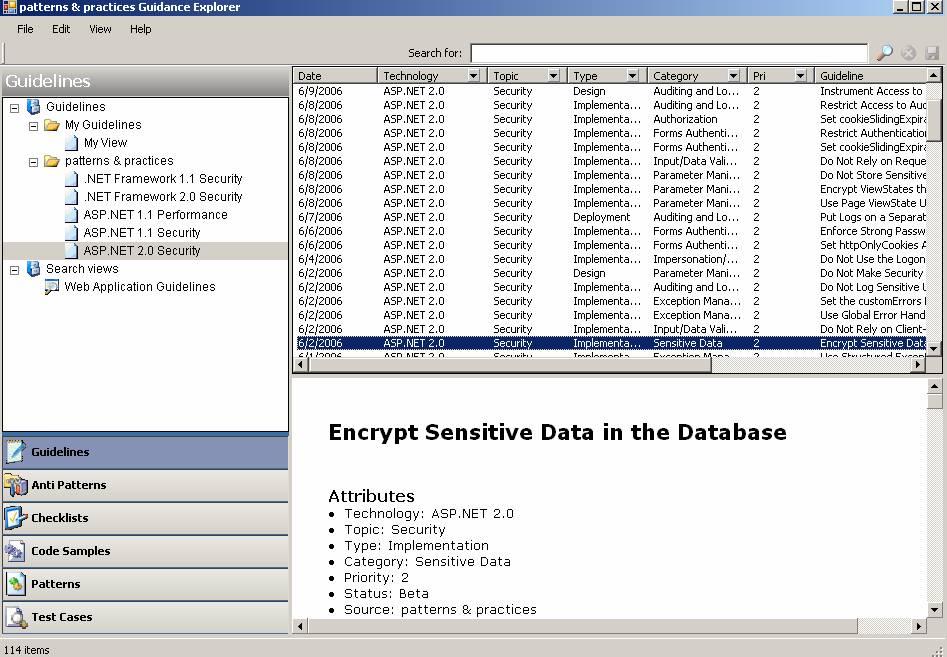
Although I have disks about .NET patterns & practices, a desktop Guidance Explorer is quite handy:


The only problem is that the explorer does not include enough topics at this point. The developing group is adding and releasing more content nearly weekly.

Is there an auto update feature in the explorer? Unfortunately, no.

Using I/O Completion Port (IOCP) to implement our own thread pool

Here I talk about another old but important technology for .NET server application.

Before we discuss thread pool, a concept should be clear: You can generate as many threads as you want in .NET code, but the default thread pool has at most 25 threads.

For a server application, it is normally necessary to use thread pool to leverage client requests, even on a single CPU computer.

1. Thread pool background knowledge

Creating thread is expensive: To create a thread, a kernel object is allocated and initialized, the thread's stack memory is allocated and initialized, and Windows sends every DLL in the process a DLL_THREAD_ATTACH notification, causing pages from disk to be faulted into memory so that code can execute. When a thread dies, every DLL is sent a DLL_THREAD_DETACH notification, the thread's stack memory is freed, and the kernel object is freed (if its usage count goes to 0).

Thread pool keeps some idle threads in suspended state to save time. At first, there is no thread in the thread pool. When the first request comes, a thread is created to process the request. If the request process takes long time (such as accessing web service), the thread enters sleeping mode at a certain time, the thread pool can create another thread to serve queued requests. When web service response comes back, the sleeping thread is woken up to continue the process. After the request is processed, the thread does not simply die, but serves other requests.

If we do not use thread pool, we will end up using one single thread to serve all client requests sequentially (for long-running request, the performance is terrible); or we create/destroy a thread for each client request, which is time consuming for large amount of requests.

2. Why do we need our own thread pool

By default, there are 25 threads in the thread pool for a .NET application. Normally, the .NET thread pool is OK if there are not many services running in the application and each request process is short. But if the application have many tasks to do (with several back ground threads, scheduler, many long-running requests), it is necessary to build our own thread pool.

3. How to build thread pool

Windows Server I/O Completion Port (IOCP) is a kernel queue that can be used for thread pool. The basic idea is to allocate a number of threads to wait on the queue. A request on the queue includes request data address that is supposed to indicate delegate value, so that the thread can run the delegated method.

You can read more about IOCP thread pool implementation in C# from Part I and Part II

The problem of the article is that the author did not show how to get the request data. You should use Target property of GCHandle to get the real .NET data back.

Microsoft Identity Integration Server

Last night, I attended MICSUG user group meeting. The topic of the meeting was about Microsoft Identity Integration Server (MIIS) to integrate user identities from different data sources. MIIS is a good server for a big company where some legacy systems or departments want to share user identity.

The picture below is an example of MIIS use case. MIIS developer can define attribute mapping for data sources (SQL server, flat file, Active Directory, etc) to import/export identity data.

The current version has limited ability to manage password though. It is understandable that many systems use hash code to store password, so that MIIS can not get original password out. MS is developing password management in next version.

The next version of MIIS can also support Extranet for B2B/B2C identity integration. InfoCard (CardSpaces) will also be supported. It sounds like MIIS will become a good middleware for a big company.

Web Service Host Application Implementation

I have been curious for a long time about how Web Service host application is implemented. After I build .NET web service assembly, how can Web Service host application receive request and call the correct method?

From the research I did on Web Service topics these days, I have a concrete idea about how to implement a Web Service host environment. How does ASP.NET platform process Web Service request is beyond my current ability. Here I only talk about the main steps for a normal Web Service host application to process Web Service request.

Reflection is the key for Web Service host application to work.

1. We define a Web Service class and Web Methods by using according attributes. When we deploy the assembly to the host application, the application uses reflection to load the assembly and initialize properties using those attributes:

Assembly assem = Assembly.LoadFrom(assemblyPath);
foreach (Type t in assem.GetExportedTypes())
{
foreach (MethodInfo info in
t.GetMethods(BindingFlags.Public | BingFlags.Instance)
{
if (info.IsDefined(typeof(WebMethodAttribute), false))
{
// Set according properties
}
}
}

Reflection is also used here to generate WSDL file by going through WebMethodAttribute.
2. When a SOAP request comes, the host application parses the SOAP packet to get class name, method name and parameter list.
3. The host application allocates an instance using the class name, either from instance pool or using a singleton
4. The host application finds the method by using method name and calls the method:

MethodInfo info = type.GetMethod(methodName);
object result = info.Invoke(instance, parameters[]);

5. Return the object in SOAP packet if there is no error; otherwise, return exception

The steps above are my simplest design of a Web Service host. I will consider WSE later.

Dynamic Code Compilation

Maybe you already know this old technology -- dynamic code compilation, but I didn't touch it until today.

Suppose we put code on production box, later we need trace a bug in production environment. Of course there is no Visual Studio installed on production box. How can we do? Sometimes it is too complex to build a testing project and upload to production box. What about building a generic editor with code compilation capability, so that we can put testing code in it and compile the source code dynamically without complex command line typing?

Another example is Application Server. It is a good feature to compile testing code inside the server environment for module's stress test.

Inside the editor, we can define our own format for DLL references. For example:

//@ref "DLL file name"

The editor compiles source code in these steps:
  1. Create an instance of CodeDomProvider CSharpCodeProvider (VBCodeProvider for Visual Basic)
  2. Provide CompilerParameters for compiler options, such as adding DLL references
  3. Compile source code using CompileAssemblyFromSource method of the CodeDomProvider
  4. Check CompilerResults
  5. Execute generated application if there were no errors

SoapHttpClientProtocol and XMLSerializer

I took it for granted that because .NET web service client sends SOAP request to invoke web service method, the client side should use SoapFormatter to serialize SOAP request parameters. Today I know I was wrong.

Actually the client side uses XMLSerializer (instead of SOAPFormatter) to serialize SOAP request content.

Why? Because SOAPFormatter (or BinaryFormatter) serializes all public, private data members and even methods to a stream, while XMLSerializer only serializes public data members. Web service is supposed to integrate separate applications in different platform (.Net, or Java, etc.), so it does not make sense to send private members and methods to the other side.

If you want to send the whole object to the other side, you should use .NET remoting where you can make use of SOAPFormatter or BinaryFormatter.