Crystal Report generates PDF in different fonts on different servers

We were satisfied with Crystal Report (CR) to generate PDF on the fly until we put CR templates on production servers.

The CR templates were tested on DEV and QA servers without any problem. But when the templates were put onto production box, we were amazed how messy the generated PDF looked like: the font size were mysteriously changed and paragraphs overlapped! @^@

I searched for reasons on Internet for hours, until I found one possible answer here: Typically when you are seeing page formatting issues on different machines, it could be because of printer drivers (or lack of). The reporting engine relies on the printer driver configured on the machine to provide information so that a page can be properly rendered. If you designed the report on your dev machine which is using PrinterA and then deploy to another machine using PrinterB, the formatting could be off.

My program was a .NET web service to create PDF document using ExportToDisk not PrintToPrinter:
oDocument.ExportToDisk(
ExportFormatType.PortableDocFormat, sOutputFile);

so I wondered if the printer was the real problem. After I was told the production server pointed to the exact same printer as QA server, I reluctantly asked IT to check version of printer driver on both servers.

Then ... IT told me that the servers had different versions of printer driver even they pointed to same printer. After IT installed the same latest drivers on servers, the formating issue was resolved. :)

Although we had to postpone production delivery, it's good to know some software use printer driver to arrange layout internally.

Zero to Biztalk Weekend

In the wonderful "Zero to Biztalk Weekend", Biztalk expert Geoff Snowman gave us two-day FREE hands-on labs and demos about Biztalk 2006 (and R2)! The hands-on labs were well designed and the lab document was in great details.

Biztalk is a useful product to integrate systems together. From concept, it receives messages from Receive Adapter/Port, processes messages in Orchestration (optional), and sends out messages using Send Adapter/Port. Biztalk can run long-running transactions, which is very important for real world business.


Below are the agenda and my comments for the labs:


Saturday (06/02/2007)

1. Architecture and Content-Based Routing: Deciding Where to Send a Message

This hello-world type XCopy lab uses File adapter to receive and send files without transformation. This is a good introduction of Biztalk adapter concept.

2. The BizTalk Mapper: Transforming Between Message Formats

Biztalk uses XML intenally to represent messages. When Biztalk integrates multiple systems, it is necessary to transform different data schemas into one internal schema; after business process, Biztalk will transform internal XML to according external schema.

But how to deal with non-XML input, such as flat file? Well, that is a topic in the second-day lab.

3. The SQL and FTP Adapters: Sending Messages to Databases and IIS

FTP adapter has the same logic with normal FTP client software, which is easy to use.

SQL adapter is a little complex: to map Biztalk XML schema to database table or stored procedure parameters. Fortunately there is a wizard to generate the interesting SQL schema.

4. Creating a Simple Business Process. Publishing a Business Process as a Web Service. Using the SOAP Adapter

Orchestration with complex workflow can be published as a normal web service. Unlike using File adapter where Biztalk checks file system periodically for new file, Web Service request can go directly into Message Box without waiting for Biztalk polling. I believe Biztalk server uses similar machenism of SQL Server Notification Service to notify an Orchestration a request is coming.

5. Correlation: Which Instance of My Business Process Sees My Incoming Message?

Correlation has been one of exciting build-in features of Biztalk for a long time. Correlation is normally used to match responses with proper original requests sent out by Orchestration. You do not need write code for correlation.

Sunday (06/03/2007)

1. The Flat File Wizard and the Pipeline Designer: Dealing with Text Files.

Biztalk 2006 has a new Wizard to convert Flat file into XML. The wizard parse a sample flat file data to let user select delimiter and generate XML schema. The wizard is easy to use.

But how about binary file? Is there a wizard to parse and generate XML schema? No, you have to write your own pipeline component to parse binary format.

2. Integrating with SharePoint and InfoPath

Biztalk has Human Workflow solution. Its name sounds good, but remember: Do not use it! The reason is we have SharePoint 2007 with built-in workflow feature. SharePoint and InfoPath are good tools for people to approve/decline messages, and Biztalk can communicate with SharePoint database.


3. The Business Rules Engine: Separating the Business Logic from the Application

Biztalk is not only used for we developers, of course. Business people has a tool to modify business rules (e.g. change pricing rate, change approve/decline rules).

4. Business Activity Monitoring: Tracking the Business Process (Demo)

BAM is valuable to business people to track activities in their own vocabulary. I am not so sure if it is built on SQL Server Reporting Service or not, but it looks similar.


Overall, the two-day training is very good to know architecture of Biztalk and have some hand-on experience. With time limit, it is hard to know the internal of Biztalk in only two days. I am waiting for level 200 or 300 training in the future.

To remove “Is Identity” setting in SQL Server: Not simple

Yesterday I found a seems-like-simple SQL problem: It is a simple task inside SQL Server Enterprise Manager (Management Studio), but there is no simple single SQL statement to set “Is Identity” to “no” for a table column. Because the setting is not a constraint, “alter table” statement does not work.

It turns out I have to create a same temporary column, copy all data to that new column, remove the original column, and rename the temporary column back to that original name. Another way is to create a temporary table without setting "Is Identity" and copy all data ... Oh my, such a “simple” work!

But fortunately there is a tip available to generate SQL script for database schema change: In SQL Server Enterprise Manager, when you change table schema, you can let Enterprise Manager generate the schema change script for you. The most left button of this tool bar is used to “Generate change script”:


Yesterday, I used it to generate a complex script to remove “Identity” setting for a column:
-- To remove Identity setting of the Id column
BEGIN TRANSACTION
SET QUOTED_IDENTIFIER ON
SET ARITHABORT ON
SET NUMERIC_ROUNDABORT OFF
SET CONCAT_NULL_YIELDS_NULL ON
SET ANSI_NULLS ON
SET ANSI_PADDING ON
SET ANSI_WARNINGS ON
COMMIT
BEGIN TRANSACTION
GO
ALTER TABLE dbo.partner_attribute_name
DROP CONSTRAINT DF_partner_attribute_name_last_update_date
GO
ALTER TABLE dbo.partner_attribute_name
DROP CONSTRAINT DF_partner_attribute_name_creation_date
GO
-- Create a temp table
CREATE TABLE dbo.Tmp_partner_attribute_name
(
partner_attribute_name_id int NOT NULL,
attribute_name varchar(50) NOT NULL,
description varchar(200) NOT NULL,
last_update_date datetime NOT NULL,
creation_date datetime NOT NULL
) ON [PRIMARY]
GO
ALTER TABLE dbo.Tmp_partner_attribute_name ADD CONSTRAINT
DF_partner_attribute_name_last_update_date
DEFAULT (getdate()) FOR last_update_date
GO
ALTER TABLE dbo.Tmp_partner_attribute_name ADD CONSTRAINT
DF_partner_attribute_name_creation_date
DEFAULT (getdate()) FOR creation_date
GO
-- Copy all data to the temp table
IF EXISTS(SELECT * FROM dbo.partner_attribute_name)
EXEC('INSERT INTO dbo.Tmp_partner_attribute_name
(partner_attribute_name_id, attribute_name
, description, last_update_date, creation_date)
SELECT partner_attribute_name_id
, attribute_name, description
, last_update_date, creation_date
FROM dbo.partner_attribute_name
WITH (HOLDLOCK TABLOCKX)')
GO
DROP TABLE dbo.partner_attribute_name
GO
EXECUTE sp_rename N'dbo.Tmp_partner_attribute_name'
, N'partner_attribute_name', 'OBJECT'
GO
ALTER TABLE dbo.partner_attribute_name ADD CONSTRAINT
PK_partner_attribute_name PRIMARY KEY CLUSTERED
(
partner_attribute_name_id
) ON [PRIMARY]
GO
COMMIT

Note: You should generate the script BEFORE you save the changes in EM. Otherwise, that button will be disabled.

A small compiler - Wilco Syntax Highlighting

Although I am quite busy these days for my projects at hand, I still try to find time to do what I really want: to dig into compiler, operating system, and CLR framework.

Yesterday, I spent hours to analyze a popular syntax highlighter tool - Wilco SyntaxHighter, because it is a small compiler to some degree. :)

The highlighter parses string source (the code to be highlighted) to scan tokens (comment, string, key word). Each token includes position/length information in the string source and related with highlighter style data. Then the parser reads the source again to merge those parsed tokens. The string segment of the token will be updated with style data. Other string segment will leave as-is.

The good feature of that parser is to build a scanner chain. For example, to parse C# code, these scanner will be used: CommentBlockScanner (/* ... */) -- CommentLineScanner (//) -- StringBlockScanner (@) -- StringLineScanner ("") -- WordScanner. When the current and following characters match CommentBlockScanner, the CommentBlockScanner will continue to read characters to the end of the comment block and take that block as a Comment token; if the current character does not match CommentBlockScanner, then it may match the next scanner in the scanner chain ... If the character does not match any scanner, then it does not belong to a token and should be ignored.

For different type of language (e.g. Java, CSS, etc), we can build and use different scanner chain. But the basic parsing logic is still same.

The concept of Compiler is very useful when generating code dynamically. When the theory of "Software Factory" becomes real, code generation tool will be the fundamental in the system.

MS AJAX UpdatePanel throws Sys.WebForms.PageRequestManagerParserErrorException

I wrote ASP.NET code to call a service to generate and download a PDF file. At first, I tried to use AJAX UpdatePanel in the ASP.NET code to show progress because the service call may take long time. When the service call returned, I wanted to show the PDF file directly in browser on the same ASP.NET page:
  // Stream PDF kit to client
Byte[] buffer = File.ReadAllBytes(filePath);
base.Response.Clear();
base.Response.ContentType = "application/pdf";
int length = buffer.Length;
base.Response.AddHeader("Accept-Header", length.ToString());
base.Response.AddHeader("Content-Length", length.ToString());
base.Response.OutputStream.Write(buffer, 0, buffer.Length);
base.Response.Flush();
base.Response.End();

But I saw this exception message:

Sys.WebForms.PageRequestManagerParserErrorException: The message received from the server could not be parsed ...

Then I realized the UpdatePanel JavaScript tried to parse the returned data for the original web page, but it received strange PDF stream instead. I found the explanation here:

The UpdatePanel control uses asynchronous postbacks to control which parts of the page get rendered. It does this using a whole bunch of JavaScript on the client and a whole bunch of C# on the server. Asynchronous postbacks are exactly the same as regular postbacks except for one important thing: the rendering. Asynchronous postbacks go through the same life cycles events as regular pages (this is a question I get asked often). Only at the render phase do things get different. We capture the rendering of only the UpdatePanels that we care about and send it down to the client using a special format. In addition, we send out some other pieces of information, such as the page title, hidden form values, the form action URL, and lists of scripts.

It turned out that I should using Response.Redirect() to another page to show the PDF file in browser. To avoid the same exception, there is no AJAX code in the second page.

A missing feature of WF

Microsoft Workflow Foundation (WF) is designed to build a kind of Domain Specific Language. You can take WF as a higher level programming language. For example, it has "while" and "if" statements (activities). All the statements run sequentially.

At this time, WF is good for back end process, but not for (web) user interface. Why? Because WF does not support "Back" button. Let's suppose a web application using WF to control page flow. It is very common for user to input data across pages and want to go "back" to previous pages to change data. WF does not provide built-in mechanism to do that.

How to implement "Back" logic in WF? WF needs a stack to save states for previous activities. When user clicks "Back" button, WF should pop up previous state from stack and continue the "previous" work.

I hope the new version of ASP.NET integrated with WF can have that "Back" button feature.

Crystal Report .NET is lazy

Crystal Report .NET can bind .NET object to its report template, which I took for granted for a long time until I really get my hands dirty these days.

The question is: could you bind composited object in Crystal Report .NET? For example, an Employee class can be like this:

public class Employee
{
public string m_name;
public Address m_address;
public Salary m_salary;
}

Address and Salary are also classes.

How can I bind an Employee object to Crystal Report to show detailed Address and Salary information? It turns out Crystal Report .NET can only access the top level properties of an object (only m_name in this case)! Crystal Report .NET is too lazy to dig into the object hierarchy.

Ugly solution? You should create a flat class including all properties of all children classes! A mapping method to fill data to the flat class is needed of course.

In my current project, I have a class that is composited with many other child classes. If I make all fields flat in one class, there will be more than one hundred properties.

Except that I have to spend days to create flat classes, Crystal Report also gives me a big task from now on: to keep the flat classes synchronized with those hierarchical classes.

Beautiful Taiji performance in 2007 Chinese New Year gala


Chinese New Year gala has been a "traditional" program for more than 1 billion people for about 20 years. I like martial art programs every year. This year, the martial art program is so beautiful that lots of young Chinese want to learn Taiji after watching the performance.

Eight national and international Taiji champions showed their GongFu. This is the international champion Zhou Bin:


This is the link for the Taiji (It looks like Chen-style Taiji) and dance part of 2007 Chinese New Year gala:

http://www.youtube.com/watch?v=6hpYtc0BLZ8

WhileActivity and ActivityExecutionContext in WF

WhileActivity is a special activity in WF when ActivityExecutionContext (AEC) is concerned, because it creates a new AEC for each iteration.

Why? You can know the reason from common programming languages. For example, the below C# while statement adds/removes local variables from stack for each iteration:
while (conditionIsMet)
{
string output = DateTime.Now.ToString();
int count = 0;
......
}

WF WhileActivity has similar logic for each iteration: to create a new AEC based on the template activity (e.g. the SequenceActivity inside the WhileActivity).

Will the new AEC be destroyed at the end of each iteration? You may think "Of course! This is an obvious question". But the answer is "yes or no".

The answer is yes for normal cases without the need for compensation. There will be only one new AEC in memory for the iterations.

But the answer is no when compensation is needed. If a CompensatableActivity is defined inside the WhileActivity and when an exception occurrs in one iteration, all the previous iterations will be compensated. That means all previous AEC's can not be destroyed after each iteration. They have to be in memory for compensation purpose.

According to Krishnan:"The runtime will clean up execution contexts after each WhileActivity iteration. But only if you don't have an ICompensatableActivity inside (if you do, the EC's will stay in memory until the next persistence point.)"

XmlSerializer may cause memory leak

In my previous post, I mentioned XmlSerializer.dll is needed to serialize/deserialize types during web service call. But I did not know a potential memory leak problem until today from an excellent MSDN article: Do not use the overload of XmlSerializer constructor that takes the XML root element name as its second parameter!

As you may know, once a .NET assembly is loaded into memory, it will not be unloaded until the hosting AppDomain is unloaded. XmlSerializer constructor generates a temporary assembly for the type to be serialized using reflection. Because the code generation is expensive, the assembly is cached in memory on a per-type basis.

For example, the following code will create a cached assembly for type Employee:
XmlSerializer serializer = new XmlSerializer(typeof(Employee));

Whenever an Employee object is to be serialized, the cached assembly will be used.

But sometimes, we may want to change XML root name in the serialized XML message in a web service. An option is to call an overloaded constructor with XML root name as a parameter:
XmlSerializer serializer = new XmlSerializer(typeof(Employee), 
new XmlRootAttribute("Manager"));

Because the root name parameter is supposed to be dynamic, XmlSerializer will not cache the generated temporary assembly. It will generate a new assembly every time you create a new XmlSerializer with that parameter, and the generated assembly will stay in memory unless AppDomain is unloaded. So more and more generated assembly will stay in memory -- memory is being leaked!

If the root name is static, you can use XmlRootAttribute on the class to change root name of the serialized type; if the root name is dramatically dynamic, there is no easy way to solve the leak problem yet ...

That so-called security feature is still in IE 7 ?!


I believe you saw this warning window for many times when using IE. The reason is the web page of HTTPS URL includes both secure (HTTPS) and nonsecure (HTTP) content. When you view page source, you can see there is image, CSS source, JavaScript src, or other content that begins with "http://", not "https://".

I do not know the reason why IE team still keep this "feature" in IE 7:

1) Why should developer put HTTPS for a common image in web page? A common image should be fetched using HTTP directly because it is also shared by other nonsecure site
2) If I embed google map in a secure site, why should I use HTTPS for google content?

Although developers can write code to map URL from HTTPS to HTTP on web server to solve the problem, although users can change IE security options to enable "Display mixed content", one thing is for sure: This feature of IE is useless and annoying.

A good feature of InfoPath 2007

Last night, I attended MS meeting of "Overview of new Portal features in Microsoft Office SharePoint Server 2007". Although the workflow feature for document management sounds good to me, I have deep impression about a good feature of InfoPath 2007: One form everywhere!


Basically, you can design a form to deploy only once. If a user has InfoPath installed on his/her machine, the user will download and fill the form locally (smart-client version); if the user does not have InfoPath installed, he/she can use popular web browser to fill the form (browser version, slightly different from smart-client version); the user can even see the form on a mobile device.

"One form" makes development and business process much easier.

Something big - Windows Workflow Foundation (WF) and ...


"Something big is about to happen ..." is the very first statement of the excellent book "Essential Windows Workflow Foundation".

The book convinced me that WF will change our programming world by enabling domain specific language: Programmers can build domain specific WF Activities, then business people can build system using those WF Activities directly! -- That will be a really BIG thing!

Another BIG thing I realize will be: big monitor! Our current monitor is not designed to show workflow. Take a brief look at a workflow diagram, you will know my meaning. :)

SOA Messaging or bridge table?

Nowadays, when we integrate different systems together inside a company, Service Oriented Architecture (SOA) is the first choice.

But is it a really good choice? SOA is based on messaging to transfer request and response. Messaging gives us decoupling advantage, but also unreliability.

Let's suppose one case: System A sends message to System B for data update. What will happen if the message is lost for some reason (out of buffer, system failure, etc.)? Should we build shake-hand protocol between A and B to make sure the message is successfully delivered?

How about the old way -- to use a bridge table in a shared database? System A can add a new record into the bridge table for data update; System B can query the bridge table periodically (or to use database notificatione, like SQL Server 2005) to get the update. In this way, we can guarantee the update "message" is delivered from A to B.

If you think there is delay for this solution, SOA messaging also has delay. We can adjust query period for performance issues.

I am not saying SOA is bad. I just want to say when you integrate systems, old way may be a better choice than SOA.

How to break a connection in LinkedIn

I invited several friends to my linkedin account. I will invite more later, because it is an easy way to find old friends to keep in touch.

But it is hard to delete a person from my connection list: I did not find any button to break a connection. (This sounds like I hate somebody, no, I only do not want to keep many names that I can not remember well.)

Finally, I got this link somewhere:

http://www.linkedin.com/connections?displayBreakConnections=

Hopefully, when I delete a person from my connections, he/she would not receive an email like "Jun hates you! He does not want to see you any more!" :)

Column Data Encryption in SQL 2005

How to encrypt Social Security Number or Credit Card Number in SQL database? We can not use one-way hash, which can be used to verify password in some solutions. For SSN, we should be able to decrypt the data when needed.

To speed up process, we should use symmetric key – same key for encryption and decryption. When we add a new record, the key is used to encrypt the data before the record is physically added into data table; when we get the record, the same key is used to decrypt the data before it is returned to client program.

Here are the questions:

1. Where do you save the symmetric key? It is not a good idea to include plain text key in every related SQL statements or stored procedures – it is too easy to hack and too complex to change key!

Ok, I can put the symmetric key (key1) into a central table in SQL server database. To avoid hacking, I also encrypt key1 using another symmetric key (key2) – good :) But where should I put key2 then? The problem to save key2 is very similar to the initial problem to save key1.

2. When the encryption key is changed for security reason, we should decrypt the old data using the old key and then to encrypt all data using the new encryption key. Do we need track which column in which table is encrypted using which key? What will happen if somehow we forget to keep the tracking up-to-date?

Fortunately, SQL Server 2005 builds the encryption feature for us. :)

For question #1, SQL Server uses multiple levels of keys:

Symmetric key --encrypted by--> Database Master Key or certificate --encrypted by--> SQL Server Service Master Key --encrypted by--> Windows DPAPI and the service account credential or the machine key.

The benefit of multiple level keys is that you do not need to provide any password to decrypt a key. SQL Server can decrypt the key by itself. What you need is to use symmetric key name in your code.

Below is a sample from http://msdn2.microsoft.com/en-us/library/ms179331.aspx:

USE AdventureWorks;
GO

--If there is no master key, create one now.
IF NOT EXISTS
(SELECT * FROM sys.symmetric_keys WHERE symmetric_key_id = 101)
CREATE MASTER KEY ENCRYPTION BY
PASSWORD = '23987hxJKL969#ghf0%94467GRkjg5k3fd117r$$#1946kcj$n44nhdlj'
GO

CREATE CERTIFICATE HumanResources037
WITH SUBJECT = 'Employee Social Security Numbers';
GO

CREATE SYMMETRIC KEY SSN_Key_01
WITH ALGORITHM = AES_256
ENCRYPTION BY CERTIFICATE HumanResources037;
GO

USE [AdventureWorks];
GO

-- Create a column in which to store the encrypted data.
ALTER TABLE HumanResources.Employee
ADD EncryptedNationalIDNumber varbinary(128);
GO

-- Open the symmetric key with which to encrypt the data.
OPEN SYMMETRIC KEY SSN_Key_01
DECRYPTION BY CERTIFICATE HumanResources037;

-- Encrypt the value in column NationalIDNumber with symmetric
-- key SSN_Key_01. Save the result in column EncryptedNationalIDNumber.
UPDATE HumanResources.Employee
SET EncryptedNationalIDNumber = EncryptByKey(Key_GUID('SSN_Key_01'), NationalIDNumber);
GO

-- Verify the encryption.
-- First, open the symmetric key with which to decrypt the data.
OPEN SYMMETRIC KEY SSN_Key_01
DECRYPTION BY CERTIFICATE HumanResources037;
GO

-- Now list the original ID, the encrypted ID, and the
-- decrypted ciphertext. If the decryption worked, the original
-- and the decrypted ID will match.
SELECT NationalIDNumber, EncryptedNationalIDNumber
AS 'Encrypted ID Number',
CONVERT(nvarchar, DecryptByKey(EncryptedNationalIDNumber))
AS 'Decrypted ID Number'
FROM HumanResources.Employee;
GO

To support server cluster, you can export Service Master Key, Database Master Key, symmetric key and certificate to another server.

For question #2, when a key is to be changed, you should use SQL command to change or recreate a key, so that SQL Server can decrypt old data and encrypt data using the new key automatically.

The encrypted data begins with symmetric key GUID. You can define several symmetric keys to encrypt different data columns. SQL Server can get proper key using the GUID part.

Using iText to build PDF on the fly

Although there are many solutions (such as XML-FOP) to generate PDF on the fly, iText is a good choice to read PDF template and bind data dynamically.

1) For PDF form where data fields have fixed length, it is quite easy to use iText (I use C# version iTextSharp here) to bind data to PDF Text Field:

// Read PDF template
iTextSharp.text.pdf.PdfReader pdfRd = new iTextSharp.text.pdf.PdfReader(Server.MapPath("~/SampleJS.pdf"));
iTextSharp.text.pdf.PdfStamper stamp = new iTextSharp.text.pdf.PdfStamper(pdfRd, outputStream);

// Set form Text Fields
iTextSharp.text.pdf.AcroFields fields = stamp.AcroFields;
fields.SetField("formText", value);

// Close stamp
stamp.Close();

2) For free text data, you cannot put PDF Text Field to show data. For example, if you want to bind data to this template:

"Welcome to «Institution»! Please send mail to «Person» before «Date»"

You cannot use PDF Text Field because Text Field has fixed length. If «Institution» value is short, there will be extra blank space in the statement.

So what can you do? You can put the template statement into one Text Field with “Read Only” permission. Then you can replace the string with data like below:

// Get Text Fields from PDF file
iTextSharp.text.pdf.AcroFields fields = stamp.AcroFields;

// Get template
string formText = fields.GetField("formText");

// Replace template with data
formText = formText.Replace("«Institution»", txtInstitution);
formText = formText.Replace("«Person»", txtPerson);
formText = formText.Replace("«Date»", date);

// Set back the Text Field
fields.SetField("formText", formText);

3) How to insert image? PDF Text Field can be a placeholder for image. For example, to add a logo image to a placeholder:

// Get content to make changes
PdfContentByte overContent = stamp.GetOverContent(1);

// Get logo image
iTextSharp.text.Image logo = iTextSharp.text.Image.GetInstance(Server.MapPath("~/logo.jpg"));

// Get logo placeholder position
float[] logoArea = fields.GetFieldPositions("Logo");

// Get logo rectangle
iTextSharp.text.Rectangle logoRect = new Rectangle(logoArea[1], logoArea[2], logoArea[3], logoArea[4]);

// Set logo position in the placeholder (right alignment)
logo.ScaleToFit(logoRect.Width, logoRect.Height);
logo.SetAbsolutePosition(logoArea[3] - logo.ScaledWidth + (logoRect.Width - logo.ScaledWidth) / 2, logoArea[2] + (logoRect.Height - logo.ScaledHeight) / 2);

// Add image
overContent.AddImage(logo);

4) How to add a barcode? Barcode is similar to image:

// Get content to make changes
PdfContentByte overContent = stamp.GetOverContent(1);

// Create a barcode
Barcode39 code39 = new Barcode39();
// Assign barcode value
code39.Code = barcodeValue;
code39.StartStopText = false;

// Create image from the barcode
iTextSharp.text.Image image39 = code39.CreateImageWithBarcode(overContent, null, null);

// Get barcode image placeholder
float[] barcodeArea = fields.GetFieldPositions("AppIDBarCode");
iTextSharp.text.Rectangle rect = new Rectangle(barcodeArea[1], barcodeArea[2], barcodeArea[3], barcodeArea[4]);
image39.ScaleToFit(rect.Width, rect.Height);
image39.SetAbsolutePosition(barcodeArea[1] + (rect.Width - image39.ScaledWidth) / 2, barcodeArea[2] + (rect.Height - image39.ScaledHeight) / 2);

// Add barcode image
overContent.AddImage(image39);

I still have several issues to solve, such as how to put rich text into Text Field. But for now, I have a good start for PDF generation. :)

Relax with Taiji -- for programmers like me

I went to doctor's office this morning and saw a poster to prevent heart disease. It says right things like low-fat diet, no smoking, no alcohol, and regular exercise (with a gym picture). But one important point is missed -- Relax. :)

Everybody has experience of blood pressure difference when he/she is in anger and in sleep. Emotion is a big factor for health, so calm your body and mind down, and relax...

Who does not know how to relax?! "I can lie down on sofa and watch TV" ... Is that a good way to relax after sitting in front of computer for a whole day?

One old phrase says "People's leg gets old first". I am not so old, but my sensitive body is verifying it: After a whole day tiring computer work and when I use eyes to look at computer or TV at night, sometimes I even feel my eyes poll energy from feet to upper body! Our brain and eyes are consuming most of our energy everyday.

So to get heath back, we should:

1) Calm down eyes (no computer or TV) and mind (no work at home)
2) Exercise in slow motion to build energy
3) Let energy go down to get legs stronger

Those are some important values of Taiji to programmers.

If you have no chance to learn Taiji with a good teacher, you can relax by yourself: Stand still and calm your body down (for half an hour). You should feel your feet are heavy and your upper body is light -- that is also Taiji. :) Your feet are heavy because your body is relaxed and energy goes down. Gradually, your feet and legs will become stronger and healthier.

To Generate PDF on the fly

PDF is a standard format for B2B or B2C process these days. I think you may have tried to download bank statement in PDF format. On web sites, the PDF documents are generated on demand. They are not generated and saved somewhere ahead.

I am doing research on how to generate PDF on the fly. I tried some products on market, but I have not found any software that can do the job for me.

This is my requirement: I have some Word template documents with merge fields that can be used to bind database data to generate real documents.
  • I already have a back-end system to generate those Word documents and convert to PDF format to print
  • The front-end system also wants to generate PDF documents on the fly when user clicks a "Get PDF" button on web page
It is too slow to convert Word document to PDF format. For some relatively large document, it may take minutes to finish. This process can be used in back-end system asynchronously, but it is not for web site.

For web site, I have to use PDF forms with form fields to bind database data. I can use PDF editor software to add form fields. But if I create both Word templates and PDF forms, it is hard to maintain both versions.

Is there a software to convert Word templates to PDF forms and to convert Word merge fields to PDF form fields? I tried Adlib, Adobe, ActivePDf, even OpenOffice. Unfortunately, none of them can do merge field conversion.

Why did we use Word template in the beginning? Because Word is better than PDF editor in formatting, and also people are familiar with Word than PDf editor too.

So, it seems I have to create and maintain both Word template (for back-end system) and PDF form (for front-end system) versions. :(

Biztalk Server 2006 and Windows Workflow Foundation: Better Together

This is a short note from last night's MICUG meeting about Biztalk and WF.

A typical system is like below:

Customers -- Processes -- Services -- Data Library -- Database

It is relatively easy to create Database, Data Library, Service programs, and Business Process Programs.

Developer can use
  • Biztalk to model business process across heterogeneous applications
  • Windows Workflow Foundation (WF) to model business processes involving human intervention

But:
  • How should I manage or control the state of a business process involving systems and people?
  • How do I allow business users to modify the business process on demand?

Biztalk 2006 does not allow to modify process on demand. Business users have to ask developer to change, compile and deploy new orchestration assembly. But WF allows to change or create workflow on demand.

Biztalk is not designed for user intervention either, while WF has sequential and stateful workflow to support user intervention.

So we can combine Biztalk and WF together to make everybody happy in two ways:
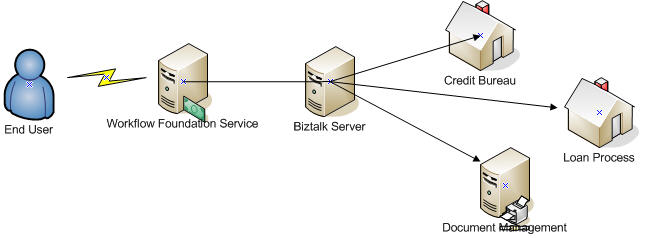
1. WF accesses Biztalk

This is a common design. WF deals with user interaction to fill in forms, then WF sends request to Biztalk to complete process across other systems.

2. Biztalk accesses WF services

In this design, Biztalk sends Web Service request to WF service for business users intervention. Also business users can access WF program to get Biztalk statistics through Biztalk BAM.

Although Biztalk R2 will build WF engine inside, the above two kinds of integration will still be reasonable.