Showing posts with label SOA. Show all posts

Why "using" is bad for your WCF service host

I scratched my head this morning for a WCF service host program. It threw a very generic exception like this:

“The communication object, System.ServiceModel.ServiceHost, cannot be used for communication because it is in the Faulted state.”

The exception above had no any useful information about where the real problem was. The logic of my program was simple:

using(ServiceHost host = new ServiceHost(
typeof(MyService), new Uri("http://localhost:8080/MyService"))
{
host.Open();
... ...
}

When I looked inside Output of VS 2005, I saw this log information:

'System.ServiceModel.AddressAlreadyInUseException'

But why WCF did not give me that exception directly? Finally, this blog explains the reason: Why "using" is bad for your WCF service host.
------------------------------------------
ServiceHost Host = null;

try
{
Host = new ServiceHost(MySingletonService);
Host.Open();
Console.ReadKey();
Host.Close();
}
finally
{
if (Host != null)
((IDisposable)Host).Dispose();
}

The configuration exception is thrown by the “Host.Open()” line, the code jumps into the finally block and tries to dispose the host. Here the host is not null but it is in a faulty state, this means that it cannot be disposed and this raises the second exception that you usually see on your application.

The lesson learn is “do not use ‘using’ to host your WCF service”.

------------------------------------------

# in URL

It may be obvious to many people: if # is included in URL, it refers to a relative location of current HTML page in browser. For example, URL "http://somewhere.com/home.htm#section1" refers to ID "section1" on "home.htm" page. So what's the point to mention again here?

The interesting thing happens when the URL is used between ASP.NET web services: The IIS server side cannot get the whole URL if a client sends URL with #. Basically, the ASP.NET web service can only get the front part of URL. Everything behind # will not be available to web service.

So if web service client wants to send parameter ("#1", "#2", or "#3") to web service, sorry, the service side cannot see that parameter.

A bug in my recent project was related with this issue: a telephony system sent dynamic URL to web services, sometimes with # in the URL.

Zero to Biztalk Weekend

In the wonderful "Zero to Biztalk Weekend", Biztalk expert Geoff Snowman gave us two-day FREE hands-on labs and demos about Biztalk 2006 (and R2)! The hands-on labs were well designed and the lab document was in great details.

Biztalk is a useful product to integrate systems together. From concept, it receives messages from Receive Adapter/Port, processes messages in Orchestration (optional), and sends out messages using Send Adapter/Port. Biztalk can run long-running transactions, which is very important for real world business.


Below are the agenda and my comments for the labs:


Saturday (06/02/2007)

1. Architecture and Content-Based Routing: Deciding Where to Send a Message

This hello-world type XCopy lab uses File adapter to receive and send files without transformation. This is a good introduction of Biztalk adapter concept.

2. The BizTalk Mapper: Transforming Between Message Formats

Biztalk uses XML intenally to represent messages. When Biztalk integrates multiple systems, it is necessary to transform different data schemas into one internal schema; after business process, Biztalk will transform internal XML to according external schema.

But how to deal with non-XML input, such as flat file? Well, that is a topic in the second-day lab.

3. The SQL and FTP Adapters: Sending Messages to Databases and IIS

FTP adapter has the same logic with normal FTP client software, which is easy to use.

SQL adapter is a little complex: to map Biztalk XML schema to database table or stored procedure parameters. Fortunately there is a wizard to generate the interesting SQL schema.

4. Creating a Simple Business Process. Publishing a Business Process as a Web Service. Using the SOAP Adapter

Orchestration with complex workflow can be published as a normal web service. Unlike using File adapter where Biztalk checks file system periodically for new file, Web Service request can go directly into Message Box without waiting for Biztalk polling. I believe Biztalk server uses similar machenism of SQL Server Notification Service to notify an Orchestration a request is coming.

5. Correlation: Which Instance of My Business Process Sees My Incoming Message?

Correlation has been one of exciting build-in features of Biztalk for a long time. Correlation is normally used to match responses with proper original requests sent out by Orchestration. You do not need write code for correlation.

Sunday (06/03/2007)

1. The Flat File Wizard and the Pipeline Designer: Dealing with Text Files.

Biztalk 2006 has a new Wizard to convert Flat file into XML. The wizard parse a sample flat file data to let user select delimiter and generate XML schema. The wizard is easy to use.

But how about binary file? Is there a wizard to parse and generate XML schema? No, you have to write your own pipeline component to parse binary format.

2. Integrating with SharePoint and InfoPath

Biztalk has Human Workflow solution. Its name sounds good, but remember: Do not use it! The reason is we have SharePoint 2007 with built-in workflow feature. SharePoint and InfoPath are good tools for people to approve/decline messages, and Biztalk can communicate with SharePoint database.


3. The Business Rules Engine: Separating the Business Logic from the Application

Biztalk is not only used for we developers, of course. Business people has a tool to modify business rules (e.g. change pricing rate, change approve/decline rules).

4. Business Activity Monitoring: Tracking the Business Process (Demo)

BAM is valuable to business people to track activities in their own vocabulary. I am not so sure if it is built on SQL Server Reporting Service or not, but it looks similar.


Overall, the two-day training is very good to know architecture of Biztalk and have some hand-on experience. With time limit, it is hard to know the internal of Biztalk in only two days. I am waiting for level 200 or 300 training in the future.

XmlSerializer may cause memory leak

In my previous post, I mentioned XmlSerializer.dll is needed to serialize/deserialize types during web service call. But I did not know a potential memory leak problem until today from an excellent MSDN article: Do not use the overload of XmlSerializer constructor that takes the XML root element name as its second parameter!

As you may know, once a .NET assembly is loaded into memory, it will not be unloaded until the hosting AppDomain is unloaded. XmlSerializer constructor generates a temporary assembly for the type to be serialized using reflection. Because the code generation is expensive, the assembly is cached in memory on a per-type basis.

For example, the following code will create a cached assembly for type Employee:
XmlSerializer serializer = new XmlSerializer(typeof(Employee));

Whenever an Employee object is to be serialized, the cached assembly will be used.

But sometimes, we may want to change XML root name in the serialized XML message in a web service. An option is to call an overloaded constructor with XML root name as a parameter:
XmlSerializer serializer = new XmlSerializer(typeof(Employee), 
new XmlRootAttribute("Manager"));

Because the root name parameter is supposed to be dynamic, XmlSerializer will not cache the generated temporary assembly. It will generate a new assembly every time you create a new XmlSerializer with that parameter, and the generated assembly will stay in memory unless AppDomain is unloaded. So more and more generated assembly will stay in memory -- memory is being leaked!

If the root name is static, you can use XmlRootAttribute on the class to change root name of the serialized type; if the root name is dramatically dynamic, there is no easy way to solve the leak problem yet ...

SOA Messaging or bridge table?

Nowadays, when we integrate different systems together inside a company, Service Oriented Architecture (SOA) is the first choice.

But is it a really good choice? SOA is based on messaging to transfer request and response. Messaging gives us decoupling advantage, but also unreliability.

Let's suppose one case: System A sends message to System B for data update. What will happen if the message is lost for some reason (out of buffer, system failure, etc.)? Should we build shake-hand protocol between A and B to make sure the message is successfully delivered?

How about the old way -- to use a bridge table in a shared database? System A can add a new record into the bridge table for data update; System B can query the bridge table periodically (or to use database notificatione, like SQL Server 2005) to get the update. In this way, we can guarantee the update "message" is delivered from A to B.

If you think there is delay for this solution, SOA messaging also has delay. We can adjust query period for performance issues.

I am not saying SOA is bad. I just want to say when you integrate systems, old way may be a better choice than SOA.

A difference between OO method call and web service method call

Nowadays, .NET framework is making web service call similar to local method call to developers. There is no much learning curve to write integrated/distributed software using web service.

Traditionally when we develop OO software, we can define base class in API and call that API by passing subclass object. The benefit of this design is that we can use a single API to process multiple subclasses, which is easy and reasonable.

How about the API for Web Service method then? Can we follow the same style (ie. passing subclass object to the API) to define base class in API?

Unfortunately, no!

For example: There is a web method HelloWorld() like below

public class BaseClass
{
public string Name = "Base Class";
}

public class SubClass : BaseClass
{
public string Type = "Sub class";
}

[WebMethod]
public string HelloWorld(BaseClass oClass)
{
return "Hello " + oClass.Name;
}

1. If client gets web service definition through WSDL, it cannot get definition of SubClass. So it has no way to create a SubClass object to call HelloWorld()

2. If client shares BaseClass and SubClass library with web service, then the client can create a SubClass object (oSubClass). But the client can not call HelloWorld(oSubClass) that generated by WSDL either, because WSDL does not have any information for SubClass, not to mention the relationship between SubClass and BaseClass

3. If client shares BaseClass and SubClass library with web service, and call System.Web.Services.Protocols.SoapHttpClientProtocol.Invoke() directly:

Invoke("HelloClass", new object[] {oSubClass});

That still can not work: XmlSerializer will throw exception because we are passing an incompatible object.

So when we design the interface of web service, we have to define APIs separately for each kind of subclass!

XmlSerializers.dll?

After I generated web service proxy using WSDL file and ran my web service client, I noticed this log:"Resolver failed to load assembly 'myAssembly.XmlSerializers.dll'". What is that?

I did not use any XmlSerializers DLL reference, or even did not know its existence until I saw XML Serializer Generator Tool:

The XML Serializer Generator creates an XML serialization assembly for types in a specified assembly in order to improve the startup performance of a XmlSerializer when it serializes or deserializes objects of the specified types.

Anyway, I added this line to "Post-build event" in Visual Studio project to generate myAssembly.XmlSerializers.dll dynamically:

"C:\Program Files\Microsoft Visual Studio 8\SDK\v2.0\Bin\sgen" "$(TargetPath)"

propertySpecified in XML Serialization

What will be saved when an object of SomeDate class is serialized?

public class SomeDate
{
private short yearField;
private bool yearFieldSpecified;

public short Year
{
get
{
return this.yearField;
}
set
{
this.yearField = value;
}
}

[System.Xml.Serialization.XmlIgnoreAttribute()]
public bool YearSpecified
{
get
{
return this.yearFieldSpecified;
}
set
{
this.yearFieldSpecified = value;
}
}
}

The serialization code is:

private static void InitializeDateFile()
{
SomeDate oDate = new SomeDate();
oDate.Year = 1910;
oDate.YearSpecified = true;

XmlSerializer xmlSer =
new XmlSerializer(typeof(SomeDate));
XmlTextWriter writer =
new XmlTextWriter(@"SomeDate.xml",
Encoding.Default);
writer.Formatting = Formatting.Indented;
xmlSer.Serialize(writer, oDate);
writer.Close();
}

With oDate.YearSpecified = true;, the output is:

<SomeDate xmlns:xsi="http://www.w3.org/2001/XMLSchema-instance"
xmlns:xsd="http://www.w3.org/2001/XMLSchema">
<Year>1910</Year>
</SomeDate>

But without oDate.YearSpecified = true;, the output becomes:

<SomeDate xmlns:xsi="http://www.w3.org/2001/XMLSchema-instance"
xmlns:xsd="http://www.w3.org/2001/XMLSchema" />

Where is Year element?

Here I found the reason:

The XML Schema Definition Tool (Xsd.exe) occasionally generates the XmlIgnoreAttribute when creating classes from a schema file (.xsd). This behavior occurs because value types cannot be set to a null reference (Nothing in Visual Basic), but all XML data types can be. Therefore, the tool creates two fields when it encounters an XML type that maps to a value type: one to hold the value, and another, special field that takes the form of fieldnameSpecified, where the fieldname is replaced by the name of the field or property. Notice, however, that this special field is generated only when the schema specifies that the element need not occur (minOccurs = "0") and that the element has no default value. The XmlSerializer sets and checks this special field to determine whether a value has been set for the field or property. Because the special field must not be serialized, the tool applies the XmlIgnoreAttribute to it.

DateTime serialization in .NET 1.1 and 2.0

When a system is running in different time zones, we need pay attention to DateTime field, because .NET 2.0 web service is not compatible with .NET 1.1 web service in design for DateTime field.

.NET 2.0 DateTime uses two-bit flag to indicate time zone: Local, UTC, or unspecified (default)..NET 1.1 does not use that flag.

.NET 2.0 serializes DateTime with time zone information for “Local” and “UTC” DateTime object. There is no time zone for “Unspecified” DateTime object. By default, .NET program uses “Unspecified” DateTime value as local time. In distributed system across time zones, this may bring troubles.

.NET 1.1 always serializes DateTime with time zone.

Below is an example tested in our project:
--------------------------------------------------

public class DateTimeSample
{
private System.DateTime m_dtDateTime =
DateTime.Parse("08/10/1971");

public System.DateTime LocalTime
{
get
{
return m_dtDateTime.ToLocalTime();
}
}

public System.DateTime Default
{
get
{
return m_dtDateTime;
}
}

public System.DateTime UniversalTime
{
get
{
return m_dtDateTime.ToUniversalTime();
}
}
}

.Net 1.1 serialization:

<?xml version="1.0" encoding="utf-16"?>
<DateTimeSample xmlns:xsd="http://www.w3.org/2001/XMLSchema"
xmlns:xsi="http://www.w3.org/2001/XMLSchema-instance">
<LocalTime>1971-08-10T20:00:00.0000000-04:00</LocalTime>
<Default>1971-08-11T00:00:00.0000000-04:00</Default>
<UniversalTime>1971-08-11T04:00:00.0000000-04:00</UniversalTime>
</DateTimeSample>

.Net 2.0 serialization:

<?xml version="1.0" encoding="utf-16"?>
<DateTimeSample xmlns:xsi="http://www.w3.org/2001/XMLSchema-instance"
xmlns:xsd="http://www.w3.org/2001/XMLSchema">
<LocalTime>1971-08-10T20:00:00-04:00</LocalTime>
<Default>1971-08-11T00:00:00</Default>
<UniversalTime>1971-08-11T04:00:00Z</UniversalTime>
</DateTimeSample>

When a system becomes distributed …

When we build a system, normally we design a simple framework at first. Then we will add more features to it. When the system is growing bigger and distributed, you will find some weird and interesting bugs.

One example is about date time. When a system was designed at the beginning, the developers decided to use local time to save all the time fields, including “date of birth”. When the program was running locally, there was no problem. But when a call center using Windows Forms application became part of the system, a weird bug arose: some clients’ date of birth had one day difference between sub systems (e.g. 08/18/1966 in one database, but 08/19/1966 in another database). Because of wrong DOB, the clients could not pass credit check.

I spent the whole afternoon and evening yesterday to check code and logs, but I didn’t find any reason. Then before I went bed last night, suddenly I realized the bug was caused by time zone difference in computers.

For example, the business layer server is in “-5” time zone, but a Call Center agent’s computer is set to time zone “-4”. When the agent inputs DOB “08/18/1966”, the Call Center Windows Forms program will pass that date (“08/18/1966 00:00:00”) in local time format to business layer server. Because of time zone difference, the server will receive “08/17/1966 23:00:00” instead – one day difference occurs.

Some computers may have random time zone settings. The DOB field becomes messy.

A quick, temporary, logically (not physically) simple solution: to make all machines in same time zone. For the long term solution, the system should change to use UTC, not local time. That will require longer time to change database and code.

Load Balancer and System.Net Connection Management

When you make first HttpWebRequest from you application to access a web site or web service, you will use this code:

WebRequest request = WebRequest.Create(url);
WebResponse response = request.GetResponse();


The process of creating a connection with remote application is complex. In order to improve connection speed for later web requests, .NET framework creates a connection pool for each URL. When a web response comes back, the connection is still available for other web requests with the same URL.

By default, the connection’s KeepAlive attribute is true. But the connection can not stay forever, of course. In .NET 2.0, you can define MaxIdleTime -- when the connection has been idle for more than MaxIdleTime, the connection will be closed by framework.

The logic looks good so far. But when a load balancer is involved, a problem may arise. Load balancer directs a request to a Web service and creates connection for the request. If the connection is idle for a period, the load balancer will break the connection without sending notification out.

Let’s suppose the load balancer breaks idle connection after 90 seconds. But on application server side, .NET connection pool keeps idle connection for 100 seconds (by default). When a new web request is sent at this point, an HTTP transport exception will be thrown.

So it is important to make sure the connection timeout settings. After contacting system administrator for load balancer setting, developer can set MaxIdleTime for the connection:

request.ServicePoint.MaxIdleTime = maxIdleTimeValue;

Please make sure the .NET connection MaxIdleTime must be smaller than the load balancer's max connection idle setting. In this way, .NET framework will create a new connection when the connection has been broken by load balancer.

Service Factory


Patterns & Practices group is making Service Factory to ease Service-Oriented programming in Visual Studio. Don Smith had an excellent webcast to demonstrate how to use Service Factory Visual Studio extension to develop ASMX and WCF solutions.

The Service Factory allows developer to write contract-first services easier (instead of current implementation-first development). Don Smith showed how to use XSD file to generate data contract classes and how to define service contract to generate web service classes.

Using I/O Completion Port (IOCP) to implement our own thread pool

Here I talk about another old but important technology for .NET server application.

Before we discuss thread pool, a concept should be clear: You can generate as many threads as you want in .NET code, but the default thread pool has at most 25 threads.

For a server application, it is normally necessary to use thread pool to leverage client requests, even on a single CPU computer.

1. Thread pool background knowledge

Creating thread is expensive: To create a thread, a kernel object is allocated and initialized, the thread's stack memory is allocated and initialized, and Windows sends every DLL in the process a DLL_THREAD_ATTACH notification, causing pages from disk to be faulted into memory so that code can execute. When a thread dies, every DLL is sent a DLL_THREAD_DETACH notification, the thread's stack memory is freed, and the kernel object is freed (if its usage count goes to 0).

Thread pool keeps some idle threads in suspended state to save time. At first, there is no thread in the thread pool. When the first request comes, a thread is created to process the request. If the request process takes long time (such as accessing web service), the thread enters sleeping mode at a certain time, the thread pool can create another thread to serve queued requests. When web service response comes back, the sleeping thread is woken up to continue the process. After the request is processed, the thread does not simply die, but serves other requests.

If we do not use thread pool, we will end up using one single thread to serve all client requests sequentially (for long-running request, the performance is terrible); or we create/destroy a thread for each client request, which is time consuming for large amount of requests.

2. Why do we need our own thread pool

By default, there are 25 threads in the thread pool for a .NET application. Normally, the .NET thread pool is OK if there are not many services running in the application and each request process is short. But if the application have many tasks to do (with several back ground threads, scheduler, many long-running requests), it is necessary to build our own thread pool.

3. How to build thread pool

Windows Server I/O Completion Port (IOCP) is a kernel queue that can be used for thread pool. The basic idea is to allocate a number of threads to wait on the queue. A request on the queue includes request data address that is supposed to indicate delegate value, so that the thread can run the delegated method.

You can read more about IOCP thread pool implementation in C# from Part I and Part II

The problem of the article is that the author did not show how to get the request data. You should use Target property of GCHandle to get the real .NET data back.

Web Service Host Application Implementation

I have been curious for a long time about how Web Service host application is implemented. After I build .NET web service assembly, how can Web Service host application receive request and call the correct method?

From the research I did on Web Service topics these days, I have a concrete idea about how to implement a Web Service host environment. How does ASP.NET platform process Web Service request is beyond my current ability. Here I only talk about the main steps for a normal Web Service host application to process Web Service request.

Reflection is the key for Web Service host application to work.

1. We define a Web Service class and Web Methods by using according attributes. When we deploy the assembly to the host application, the application uses reflection to load the assembly and initialize properties using those attributes:

Assembly assem = Assembly.LoadFrom(assemblyPath);
foreach (Type t in assem.GetExportedTypes())
{
foreach (MethodInfo info in
t.GetMethods(BindingFlags.Public | BingFlags.Instance)
{
if (info.IsDefined(typeof(WebMethodAttribute), false))
{
// Set according properties
}
}
}

Reflection is also used here to generate WSDL file by going through WebMethodAttribute.
2. When a SOAP request comes, the host application parses the SOAP packet to get class name, method name and parameter list.
3. The host application allocates an instance using the class name, either from instance pool or using a singleton
4. The host application finds the method by using method name and calls the method:

MethodInfo info = type.GetMethod(methodName);
object result = info.Invoke(instance, parameters[]);

5. Return the object in SOAP packet if there is no error; otherwise, return exception

The steps above are my simplest design of a Web Service host. I will consider WSE later.

SoapHttpClientProtocol and XMLSerializer

I took it for granted that because .NET web service client sends SOAP request to invoke web service method, the client side should use SoapFormatter to serialize SOAP request parameters. Today I know I was wrong.

Actually the client side uses XMLSerializer (instead of SOAPFormatter) to serialize SOAP request content.

Why? Because SOAPFormatter (or BinaryFormatter) serializes all public, private data members and even methods to a stream, while XMLSerializer only serializes public data members. Web service is supposed to integrate separate applications in different platform (.Net, or Java, etc.), so it does not make sense to send private members and methods to the other side.

If you want to send the whole object to the other side, you should use .NET remoting where you can make use of SOAPFormatter or BinaryFormatter.

.NET Application Server

"Application Server" has been a common buzz word in Java world for many years. J2EE Application Server hosts Java applications and provide environment for deployment, configuration, transaction, logging, session management, instance management, reporting, exception handling, load balancing etc. What application developer cares is mainly the application's business logic.

Application Server in Java world makes perfect sense, because Java runs on different operating systems. It is necessary to build a common environment to hold applications.

But in .NET world, "Application Server" is not well-known. We do not need Application Server in .NET, right? Yes or no.

Yes. The main reason is that .NET is built upon Windows system, so that .NET can use features provided by Windows System (e.g. Transaction, Logging) directly.

No. We still need an integrated environment for Enterprise software. That is the reason why MS Enterprise Library exists. But to set up and use that library is still complex for a normal developer. Compared with Java Application Server environment, .NET framework is not an integrated product for developers and project managers. The only one Application Server I know is Interactive Server. From my research on that product these days, it has some limitations.

So, can we make an application server product to hold various .NET applications? Technically yes, although not easy. Maybe MS will build application server later. I heard a rumor that IIS 7 is a kind of Application Server, but I doubt. :)

.NET web service tips

Here are list of tips for .NET web service development. I put here so that I need not google to find them later. :)

1) Generate web service interface so that we can separate implementation from WSDL. When WSDL is changed someday, we will not lose our implemenation code:
wsdl.exe /si ServerInterfaceSample.wsdl

2) Web service can use ASP.NET session state. To enable ASP.NET session state, set WebMethod.EnableSession = True. On the client you must also create a new instance of System.Net.CookieContainer. Note that to persist data for the entire application, neither step is required.

Client code:

//On the client you must add the following code (for session state only):
serviceName.CookieContainer = new System.Net.CookieContainer();

Server code:

//Setting EnableSession to true allows state to be persisted per Session
[WebMethod(EnableSession=true)]
public String UpdateSessionHitCounter() {
//update the session "HitCounter" here
return Session["HitCounter"].ToString();
}

3) Asynchronous call to web service:
Use the event-based model to asynchronously call your Web services.

//First implement the HelloWorldCompleted method using the following signature:
//public void HelloWorldCompleted(object sender, HelloWorldCompletedEventArgs args)

//Create the Web service
HelloWorldWaitService service = new HelloWorldWaitService();
//Add our callback function to the event handler
service.HelloWorldCompleted += this.HelloWorldCompleted;
//Call the Web service asynchronously
service.HelloWorldAsync("first call");
//when the Web service call returns the HelloWorldCompleted method will be called

Middle-Ware is in the Middle

I attended the "Capital Area Microsoft Integration and Connected Systems User Group" last night. It had good topics about lessons learned from Biztalk integration projects.

One of the lessons I feel important is to really know "Middle-Ware is in the Middle", which means whenever there is something wrong with the operation of an integrated system, normally either developers or clients will complain:"Middle-Ware is not working properly". But in fact, most of the cases are not because of the Middle-Ware, but the end-point applications.

To protect from the easy blame from other people, tracking and reporting are the life-savers: Keep all detailed tracking and reporting information to indicate where the real problem is, e.g. the schema of the source data has been arbitrarily changed.

We needn't work on really big project to create/use Middle-Ware. Even for small project, we will write middle-ware program occasionally. For example, we may write either Windows Service to collect data or Web Service to process data. For end user, they are back end Middle-Ware. It is important to keep event log for each process.

Service-Oriented Architecture and Biztalk Server

When people talk about Service-Oriented Architecture (SOA), they talk more details about how to write Web Services. Actually, SOA is more than web services. For developer, SOA means contract-first development for a distributed system to support interoperability between applications.

As Biztalk Server 2006 is released, let's look at its architecture for an example of SOA.
Biztalk messaging architecture
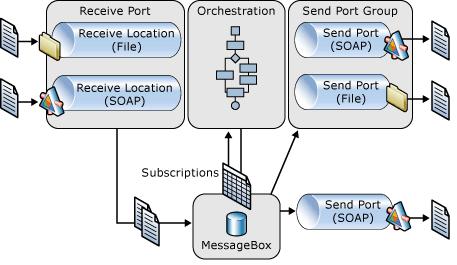
Biztalk server includes four parts: Receive Port, Message Box, Orchestration, and Send Port. Receive Port uses protocol (FTP, SOAP, etc.) specific Adpater to receive file or message, then persists the (transformed) message into Message Box. Message Box activates according Orchestration or Send Port based on subscription of the message type. Orchestration is a process workflow to do some work based on incoming message, then Orchestration may persist a new message in Message Box. Message Box activates according Send Port to send the new message out.

From the architecture, we can know that Biztalk server is in message-based. Its main function is to receive a message, and to send message after doing some work. You can also take Biztalk as a message processing service.

For development, Biztalk developers typically start by modeling the messages using XML schema. Developers then promote several message properties for routing purposes. Then Developers configure Orchtestration or Send Ports to subscribe the messages matching those promoted properties. The orchestration developed also deals with XML schema to process message. From these steps, you can see it is a contract-first development.

Biztalk application is also autonomous. Biztalk does not care about the implementation details of other connected applications. It only cares the messages received/sent using the predefined XML schema.

Until now, you can say Biztalk is a good example of Service-Oriented application. Is it a web service? No, although you can optionally publish an orchestration as a web service.

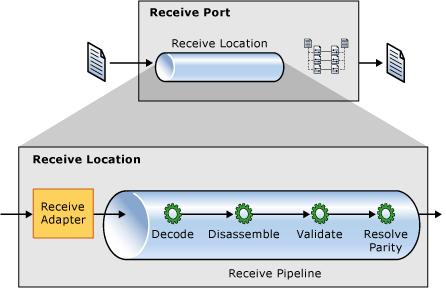
Biztalk architecture allows flexibility to connect to nearly any kind of legacy applications by using different Adapter in receive/send port. Let's take receive port as an example:
Biztalk receive port
The receive port uses protocol-specific Adpater to receive original message and add other context information to build an internal message, then the pipeline can decode the message, the last step in receive port is XML schema mapping to transform the original message into another format that Orchestration knows.

Developers can use many kinds of Adapter to receive/send message, e.g. using MSMQ, SOAP, even Windows Communication Foundation Adapter. This architecture allows to integrate various applications without modifying those applications' code.

Wrap-Up
Biztalk is a good example of Service-Oriented Architecture application. The architecture uses contract-first development and allows potential extension.

Contract-First Web Service development

Although we normally define interface (contract) between client and server in distributed environment before we really write logic code, Visual Studio does not provide this Contract-First mechanism for Web Service application development.

What VS provides is implementation-first: Developer writes web methods first, then VS generates WSDL (contract) to allow client developer to implement web service client.

The advantage of implementation-first approach is that it is quite easy to develop a web service. Developer need not write complicated WSDL file manually. When web service client accesses the web service, .NET framework will reflect web methods in web service code and generate WSDL dynamically.

The disadvantages of implementation-first approach are:
  • Web service developer can change web method easily, which may change the generated WSDL accidentally or without enough warning. This will break the contract between web service and client.

  • Web service developer may ignore the compatibility of generated WSDL to include complex object type, like DataSet. This will make Java client difficult to get result because DataSet is only used in .NET framework, not Java framework.

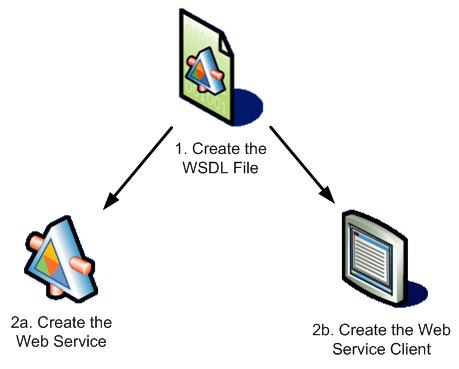
So, how can we use current tools to develop web service? Actually, we can use implementation-first approach in the beginning:
  1. We can write web methods in Visual Studio without put logic code inside. Then we can let VS generate the complex WSDL for us.

  2. We examine the WSDL to make sure it does not include .NET specific data types. We may add more parameters to it.

  3. If we changed the WSDL, we can re-generate web service code using "wsdl.exe /server <WebService WSDL file>"

  4. When the contract need modification, we should explicitly update the WSDL file and re-generate web service code. We cannot modify web method code directly. This step may overwrite original code, so it is a good idea to separate implementation code into another file


If we follows the steps above, we should be able to keep interoperability between web service and client.