Below explains why Jimmy Kimmel has a big evil in his heart.
----------------------------------------------------------
What a Journey
Chunyan Li, Ph.D.
11/8/2013
Dear all,
How long does it take us to get here today? One hour? Two hours? For me, it is 20 years! 20 years ago I arrived at this land of the free, full of ideals, perhaps from listening too much to radio Voice of America. 20 years later my sons join me to protest against ABC's spreading of racial hatred and violence. What is wrong with this picture?
I ask my teenage son whether we should just treat "killing Chinese" as a joke. He said this demonstrates what the society and media had been feeding our young kids. My heart sank. Is America moving forward or backward?
Now I ask again: How long does it take us to get here? I don't know about you, but the last 20 days seem longer than my 20 years. Those of us who stand here today must have been reading, writing, arguing, and agonizing over confusing pieces of reports and commentaries. And we ask ourselves, are we being unreasonable? Is our English that bad that we don't know what an apology is?
On 10/28, the night of our first protest, Mr. Kimmel said, "today is a weird day...I am sorry if I offended anyone." I ask ABC, who is the weird one? Who truly apologizes if he doesn't even say sorry for what? Sorry to whom? To the Chinese whose sense of tranquility is forever disturbed? To our kids whom we try so hard to shield from pain and harm? To the schools that teach kids the spirit of Dr. Martin Luther King? ABC, do you call that an apology?
In a letter to 80-20, ABC still claims it only entertains. Why is joking about killing Chinese so entertaining? Is it because we are always so nice? My friend's sweet 11-year old wants to write on his poster, "do not take advantage of us." I first didn't understand, then found out he meant "don't take advantage of us because we are nice." That broke my heart!!! ABC and Mr. Kimmel, we hold you accountable for taking away our children's precious sense of security. And we hold you accountable for sowing the seeds of hatred in other children's minds.
On 10/29, Mr. Kimmel even resorted to the ridiculous notion of cultural difference. I ask him, what cultural difference do you mean? A culture of hard work, respect, harmony versus a culture of violence and racial hatred? Then I admit there is an unbridgeable difference between Kimmel and us. We know what's right, what's wrong. And we know what humor is too! Yet we have no tolerance of your malicious joke, subsequent insult on air, then the absurd reference to culture. This only proves Mr. Kimmel you are unfit to be a public figure.
ABC, stop blaming cultural differences for your own mistakes! Except for Native Americans, all are immigrants with unique traits. Yet we share the basic value of human dignity. Stop magnifying the differences in skin colors, or accents!
I ask a third time, how long does it take us to get here? Our friends started telling us there is another written apology somewhere. Who in real life is given so many third chances? Yet I ponder, are we asking too much? I discovered to my dismay that in that written letter, Mr. Kimmel is still hiding behind the 6-year old. Come on Mr. Kimmel, you think our anger is on a 6-year old? Our anger is on your malicious question "Should we allow the Chinese to live?" Our anger is on your subsequent arrogant ridicule. Our rage is on ABC for not letting the public know the truth of these so called apologies.
America is the home of the brave. ABC, show our kids you have the courage of admitting wrong doing, show our kids you have the guts to take responsibility by dismissing Mr. Kimmel. Show us you have the resolve to institute procedures to prevent future incidences. ABC, do NOT hide behind a 6-year old! Show us what a major network can do to right its wrong!
Twenty years, twenty days. Life, liberty and the pursuit of happiness. Who doesn't want to be happy? But without life, what is liberty? Without liberty, what is happiness? Let's join hands in our pursuit of human dignity.
Teach kids to love, not to kill!
I am replacing MS ModalPopup with jQuery UI Dialog in my ASP.NET projects recently. It seemed easy in the beginning, but it turned out I had to search solutions on Internet.
Let me use a sample to explain what should be done to make jQuery Dialog work in ASP.NET page. The web page has input fields (Name and Address) and buttons (Save and Clone):

All the fields and buttons are inside an UpdatePanel. When Clone button is clicked, a Dialog will be displayed:
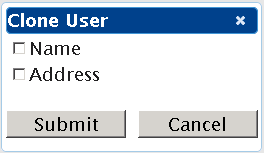
The Submit button is supposed to postback user's selection.
The JavaScript is like below:
The pnlSectionsToClone is the content panel of the Dialog. When Clone button is clicked, function DisplayCloneDialog() will be called. Everything seems simple so far. But the page had these problems:
1. When the page is loaded and Clone button is clicked, the Dialog is displayed with no problem. But once the Save button is clicked, the Clone button will throw this exception (in Firefox) and no Dialog is displayed:
Error: cannot call methods on dialog prior to initialization; attempted to call method 'open'
The reason of the exception is: after Save button is clicked, the UpdatePanel receives HTTP response and updates DOM in browser. The Dialog object in CreateCloneDialog() is removed from DOM at this time. The following 'open' will fail.
The solution for this issue is to call CreateCloneDialog() after each postback:
2. When the Dialog is displayed, the Submit button does NOT postback.
The reason for this issue is: the dialog object is added to the Document in DOM, not inside Form tag. You can see that clearly in Firebug:

To move the dialog object into Form tag for postback, you need add one extra line of code to function CreateCloneDialog():
3. In Firefox or IE8+, the dialog layout looks OK; but in IE7 (yes, many people are still using IE7), the dialog title looks like this:

This is because IE7 does not understand CSS style width:'auto'. To fix this issue, we need to manually assign width for the title when the dialog is created:
Now the dialog looks OK in IE7:

Let me use a sample to explain what should be done to make jQuery Dialog work in ASP.NET page. The web page has input fields (Name and Address) and buttons (Save and Clone):
All the fields and buttons are inside an UpdatePanel. When Clone button is clicked, a Dialog will be displayed:
The Submit button is supposed to postback user's selection.
The JavaScript is like below:
        $(function () {
            CreateCloneDialog();
        });

        function CreateCloneDialog() {
            // Clone dialog
            $('#pnlSectionsToClone').dialog(
              { autoOpen: false,
                modal: true,
                width: 'auto',
                height: 'auto',
                resizable: false
            });
        }

        function DisplayCloneDialog() {
            // Open the dialog
            $('#pnlSectionsToClone').dialog('open');
        }
The pnlSectionsToClone is the content panel of the Dialog. When Clone button is clicked, function DisplayCloneDialog() will be called. Everything seems simple so far. But the page had these problems:
1. When the page is loaded and Clone button is clicked, the Dialog is displayed with no problem. But once the Save button is clicked, the Clone button will throw this exception (in Firefox) and no Dialog is displayed:
Error: cannot call methods on dialog prior to initialization; attempted to call method 'open'
The reason of the exception is: after Save button is clicked, the UpdatePanel receives HTTP response and updates DOM in browser. The Dialog object in CreateCloneDialog() is removed from DOM at this time. The following 'open' will fail.
The solution for this issue is to call CreateCloneDialog() after each postback:
        $(function () {
            CreateCloneDialog();
            Sys.WebForms.PageRequestManager.getInstance()
                        .add_endRequest(CreateCloneDialog);
        });
2. When the Dialog is displayed, the Submit button does NOT postback.
The reason for this issue is: the dialog object is added to the Document in DOM, not inside Form tag. You can see that clearly in Firebug:
To move the dialog object into Form tag for postback, you need add one extra line of code to function CreateCloneDialog():
        function CreateCloneDialog() {
            // Clone dialog
            $('#pnlSectionsToClone').dialog(
              { autoOpen: false,
                modal: true,
                width: 'auto',
                height: 'auto',
                resizable: false
            });

            // Need add this line below, otherwise the buttons
            // inside dialog will not postback
            $("#pnlSectionsToClone").parent().appendTo(jQuery("form:first"));
        }
3. In Firefox or IE8+, the dialog layout looks OK; but in IE7 (yes, many people are still using IE7), the dialog title looks like this:
This is because IE7 does not understand CSS style width:'auto'. To fix this issue, we need to manually assign width for the title when the dialog is created:
        function CreateCloneDialog() {
            // Clone dialog
            $('#pnlSectionsToClone').dialog({ autoOpen: false,
                modal: true,
                width: 'auto',
                height: 'auto',
                resizable: false,
                open: function (event, ui) {
                    // fix for width:auto in IE7. If width is specified,
                    // the logic below is not needed.
                    var contentWidth = $(this).width();
                    $(this).parent().find('.ui-dialog-titlebar')
                    .each(function () {
                        $(this).width(contentWidth);
                    })
                },
                beforeClose: function (event, ui) {
                    //fix for width:auto in IE7
                    $(this).parent().css("width", "auto");
                }
            });
Now the dialog looks OK in IE7:
Wednesday, July 10, 2013


The Except statement is easy to understand. For example, the result of "result set A Except result set B" is like below in grey:
 But thing will easily go wrong in SQL statement when you use Except and Order By.
Take AdventureWorks database as an example here:
1. Run the 1st statement and notice BusinessEntityID=66 is in the result:
 2. Run the 2nd statement and notice BusinessEntityID=66 is also in the result:

3. How about combining those two SQL statements together with Except? From the concept, the record BusinessEntityID=66 should not be in the result, right? Let's take a look:
 It is still there! Why?!
The reason is: Order By actually belongs to the first Select statement, not the 2nd.
This is the result set for the 2nd statement without Order By:

The record BusinessEntityID=66 is NOT in the result. So the result of Except statement is actually correct.

Take AdventureWorks database as an example here:
1. Run the 1st statement and notice BusinessEntityID=66 is in the result:
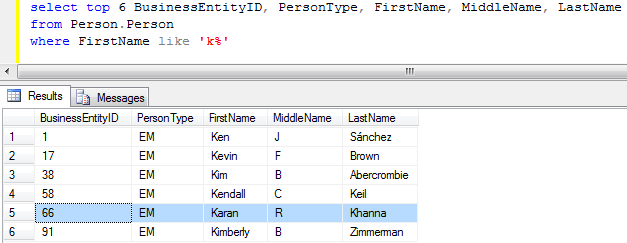

3. How about combining those two SQL statements together with Except? From the concept, the record BusinessEntityID=66 should not be in the result, right? Let's take a look:

The reason is: Order By actually belongs to the first Select statement, not the 2nd.
This is the result set for the 2nd statement without Order By:

The record BusinessEntityID=66 is NOT in the result. So the result of Except statement is actually correct.
Wednesday, March 27, 2013
You may have to migrate Intranet software applications to another Windows Domain (e.g. Due to company restructure). As Intranet applications normally uses Domain account to authorize user access, changing domain means you have to change user group settings, sometimes source code and sometimes even worse your third-party applications will not work properly -- e.g. old data uses old domain account so that user cannot change their data using new domain account.
If your applications were based on ASP.NET framework, then there is a simple solution to ease the pain at least temporarily: you keep all those ASP.NET applications in original domain and add a HttpModule (defined in web.config) to map new domain account to old domain account. When users in new domain access those applications in old domain, the ASP.NET application will only see the old domain account so the users still work in the exact same way as before.
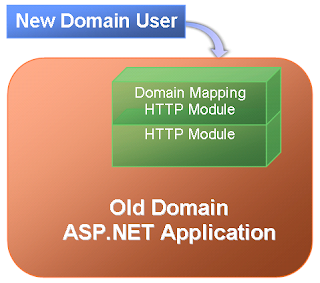
The main code logic for domain mapping HttpModule is as below:
If your applications were based on ASP.NET framework, then there is a simple solution to ease the pain at least temporarily: you keep all those ASP.NET applications in original domain and add a HttpModule (defined in web.config) to map new domain account to old domain account. When users in new domain access those applications in old domain, the ASP.NET application will only see the old domain account so the users still work in the exact same way as before.

The main code logic for domain mapping HttpModule is as below:
// Get user's domain account
string strDomainUserAccount = HttpContext.Current.User.Identity.Name.ToUpper();

// Remove domain name from the account
string strUserAccount = strDomainUserAccount;
if (strDomainUserAccount.StartsWith("NewDomain\\")) {
 strUserAccount = strUserAccount.Substring(10);
}

// Fetch cached user mappings
Dictionary userMap = (Dictionary)HttpRuntime.Cache(USER_CACHE_KEY);
if (userMap == null) {
 // If no cache is available, reload the cache from database
 // and try to get the item again
 this.ReloadUserMap();

 userMap = (Dictionary)HttpRuntime.Cache(USER_CACHE_KEY);
 if (userMap == null) {
  // Throw exception here!!
  return;
 }
}

// Get user's NTUserName from the mapping in cache
// and create a new user for Http context
if (userMap.ContainsKey(strUserAccount)) {
 string strNewAccount = userMap[strUserAccount];

 if (!string.IsNullOrEmpty(strNewAccount)) {
  // New Identity
  string strAuthenticateType = HttpContext.Current.User.Identity.AuthenticationType;
  System.Security.Principal.GenericIdentity newID =
   new System.Security.Principal.GenericIdentity(strNewAccount, strAuthenticateType);

  // Get cached roles in mapped domain.
  // If no cache is available, get from AD and put into cache
  string[] strRoles = this.GetDomainGroupsForUserFromCache[strNewAccount];
  System.Security.Principal.GenericPrincipal newP =
   new System.Security.Principal.GenericPrincipal(newID, strRoles);

  HttpContext.Current.User = newP;
 }
}
Thursday, February 04, 2010
It is quite complex to arrange Windows Form layout dynamically in .NET Compact Framework (CF) when you try to show/hide a control between other controls. Although you can use FlowLayoutPanel in desktop Windows Form application, there is no such kind of layout manager for CF.
I found an old article on CodeProject about FlowLayoutPanel, but that code cannot work on CF because CF Panel does not have OnLayout event. Also the code logic has bugs too.
After searching for a while, I decided to make a FlowLayoutPanel for CF by myself. It turns out the code is not hard to write:
Below is a sample using the logic above:

To make layout easier, I put several panels inside the FlowLayoutPanel. You can see all the controls are arranged properly. When I click the "Hide Panel 3" button, the Form becomes this:
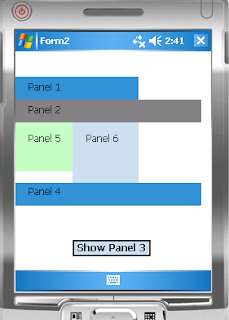
The controls below Panel 3 are moved up automatically. If I click "Show Panel 3" button, the Panel 3 will be displayed at original place and all the controls below it are moved down accordingly.
The code for the button is like below:
There is a small problem in Visual Studio though: when you drag-drop a control to the FlowLayoutPanel, Visual Studio always puts the control as the first one inside the FlowLayoutPanel. You need to modify the designer file to manually put those controls in order:
'FlowLayoutPanel1
'
Me.FlowLayoutPanel1.Controls.Add(Me.Panel1)
Me.FlowLayoutPanel1.Controls.Add(Me.Panel2)
Me.FlowLayoutPanel1.Controls.Add(Me.Panel3)
Me.FlowLayoutPanel1.Controls.Add(Me.Panel5)
Me.FlowLayoutPanel1.Controls.Add(Me.Panel6)
Me.FlowLayoutPanel1.Controls.Add(Me.Panel4)
I found an old article on CodeProject about FlowLayoutPanel, but that code cannot work on CF because CF Panel does not have OnLayout event. Also the code logic has bugs too.
After searching for a while, I decided to make a FlowLayoutPanel for CF by myself. It turns out the code is not hard to write:
Protected Overloads Overrides Sub OnPaint(ByVal pEvent As PaintEventArgs)
 Dim nextTop As Integer = 0, nextLeft As Integer = 0
 Dim maxHeight As Integer = 0
 Dim ParentWidth As Integer

 If Me.Parent IsNot Nothing Then
  ParentWidth = Me.Parent.Width
 Else
  ParentWidth = Me.Width
 End If

 ' Modify control location for the layout
 For Each myControl As Control In Me.Controls
  ' Ignore invisible controls
  If myControl.Visible = False Then
   Continue For
  End If

  If (nextLeft + myControl.Width) > ParentWidth Then
   nextTop += maxHeight
   nextLeft = 0
   ' Reset maxHeight
   maxHeight = 0
  End If

  myControl.Top = nextTop
  myControl.Left = nextLeft

  If myControl.Height > maxHeight Then
   maxHeight = myControl.Height
  End If

  nextLeft += myControl.Width
 Next
 Me.AutoScrollPosition = New System.Drawing.Point(0, 0)

 MyBase.OnPaint(pEvent)
End Sub
Below is a sample using the logic above:

To make layout easier, I put several panels inside the FlowLayoutPanel. You can see all the controls are arranged properly. When I click the "Hide Panel 3" button, the Form becomes this:

The controls below Panel 3 are moved up automatically. If I click "Show Panel 3" button, the Panel 3 will be displayed at original place and all the controls below it are moved down accordingly.
The code for the button is like below:
Private Sub btnHide_Click(ByVal sender As Object, ByVal e As EventArgs)
 If btnHide.Text = "Hide Panel 3" Then
  Panel3.Visible = False
  btnHide.Text = "Show Panel 3"
 Else
  Panel3.Visible = True
  btnHide.Text = "Hide Panel 3"
 End If

 ' Refresh the flow layout panel
 Me.FlowLayoutPanel1.Invalidate()
End Sub
There is a small problem in Visual Studio though: when you drag-drop a control to the FlowLayoutPanel, Visual Studio always puts the control as the first one inside the FlowLayoutPanel. You need to modify the designer file to manually put those controls in order:
'FlowLayoutPanel1
'
Me.FlowLayoutPanel1.Controls.Add(Me.Panel1)
Me.FlowLayoutPanel1.Controls.Add(Me.Panel2)
Me.FlowLayoutPanel1.Controls.Add(Me.Panel3)
Me.FlowLayoutPanel1.Controls.Add(Me.Panel5)
Me.FlowLayoutPanel1.Controls.Add(Me.Panel6)
Me.FlowLayoutPanel1.Controls.Add(Me.Panel4)
Wednesday, February 03, 2010
I followed How to: Configure SharePoint Integration on Multiple Servers step-by-step to configure SharePoint Integration on two servers. But on the step "Set server defaults" of "Configure the Report Server Integration Feature in SharePoint Central Administration", I only saw this error:
An unexpected error occurred while connecting to the report server. Verify that the report server is available and configured for SharePoint integrated mode.
I was sure I followed the steps carefully. Then I tried to look for error details in Web and Database log files, but there was no any error message. After many hours of investigation, I found somebody mentioned Kerberos/NTLM on MSDN Forum. As my environment did not allow me to use Kerberos, I tried to set up NTLM on both SharePoint server and Report server:
cscript adsutil.vbs set w3svc/NTAuthenticationProviders "NTLM"
Then I was so happy to see the error disappeared! :)
An unexpected error occurred while connecting to the report server. Verify that the report server is available and configured for SharePoint integrated mode.
I was sure I followed the steps carefully. Then I tried to look for error details in Web and Database log files, but there was no any error message. After many hours of investigation, I found somebody mentioned Kerberos/NTLM on MSDN Forum. As my environment did not allow me to use Kerberos, I tried to set up NTLM on both SharePoint server and Report server:
cscript adsutil.vbs set w3svc/NTAuthenticationProviders "NTLM"
Then I was so happy to see the error disappeared! :)
Friday, May 23, 2008
When using LUA (Least-Privilege User Account) on development machine, I normally add myself as sysadmin for SQL server, so that I can create database freely.
As SSAS is part of SQL Server, I took it for granted that my account was also sysadmin in SSAS. But it turned out that SSAS has different permission settings from SQL Server.
When I tried to deploy an SSAS project, Visual Studio threw the error:
Error -1055391738 : Either the '[domain]\[account]' user does not have permission to create a new object in '[machine]', or the object does not exist.
So I went to SQL Server Management Studio and connected to SSAS, but I had no permission to create SSAS database manually:
Either the '[domain]\[account]' user does not have permission to create a new object in '[machine]', or the object does not exist. (Microsoft.AnalysisServices)
One way to solve the problem is to add my account to the SSAS' server role, which means to grant server-wide security privileges to my account in SSAS:
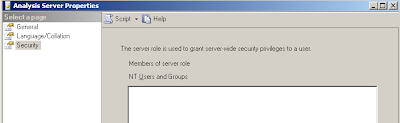
Now, I can deploy SSAS project in Visual Studio without problem.
As SSAS is part of SQL Server, I took it for granted that my account was also sysadmin in SSAS. But it turned out that SSAS has different permission settings from SQL Server.
When I tried to deploy an SSAS project, Visual Studio threw the error:
Error -1055391738 : Either the '[domain]\[account]' user does not have permission to create a new object in '[machine]', or the object does not exist.
So I went to SQL Server Management Studio and connected to SSAS, but I had no permission to create SSAS database manually:
Either the '[domain]\[account]' user does not have permission to create a new object in '[machine]', or the object does not exist. (Microsoft.AnalysisServices)
One way to solve the problem is to add my account to the SSAS' server role, which means to grant server-wide security privileges to my account in SSAS:
- Run SQL Server Management Studio as Administrator account
- Connect to the SSAS server
- Right-click the SSAS server name and select Properties from the popup menu
- Select Security to add account to server role

Now, I can deploy SSAS project in Visual Studio without problem.
Friday, May 09, 2008
It's quite weird that SharePoint (WSS 3.0) could not find any Active Directory user account from its own domain!
According to its log, WSS complained it could not get trusted domains:
But do I need care if the domain is "trusted" or not when only one domain exists? What I wanted was to get users from the same domain. MSDN also said "Users in the forest that the server is in (that is, a resource forest) are displayed automatically." But the reality was the opposite.
Finally, I had a try to add the WSS server's local domain using stsadm:
stsadm -o setproperty -url http://localhost:82
-pn "peoplepicker-searchadforests" -pv "domain:ad.int.com"
Although I had thought that the command should do nothing because I was not supposed to do that, ironically I could see users in the PeoplePicker control! :)
According to its log, WSS complained it could not get trusted domains:
05/08/2008 10:09:18.72  Error when trying to get trusted forests and domains. Exception message: Access is denied.  , callstack:    at System.DirectoryServices.ActiveDirectory.Forest.GetTrustsHelper(String targetForestName)     at System.DirectoryServices.ActiveDirectory.Forest.GetAllTrustRelationships()     at Microsoft.SharePoint.Utilities.SPUserUtility.GetTrustedDomains(List`1 trustedForestNames, List`1 trustedDomainNames)
05/08/2008 10:09:18.72  Found 1 trusted forests ad.int.com.
05/08/2008 10:09:18.72  Found 0 trusted domains
05/08/2008 10:09:18.87  Error in searching user 'Bob' : System.DirectoryServices.DirectoryServicesCOMException (0x8007052E): Logon failure: unknown user name or bad password.       at System.DirectoryServices.DirectoryEntry.Bind(Boolean throwIfFail)     at System.DirectoryServices.DirectoryEntry.Bind()     at System.DirectoryServices.DirectoryEntry.get_AdsObject()     at System.DirectoryServices.DirectorySearcher.FindAll(Boolean findMoreThanOne)     at System.DirectoryServices.DirectorySearcher.FindAll()     at Microsoft.SharePoint.WebControls.PeopleEditor.SearchFromGC(SPActiveDirectoryDomain domain, String strFilter, String[] rgstrProp, Int32 nTimeout, Int32 nSizeLimit, SPUserCollection spUsers, ArrayList& rgResults)     at Microsoft.SharePoint.Utilities.SPUserUtility.SearchAgainstAD(String input, SPActiveDirect...
05/08/2008 10:09:18.87* ...oryDomain domainController, SPPrincipalType scopes, SPUserCollection usersContainer, Int32 maxCount, String customQuery, String customFilter, TimeSpan searchTimeout, Boolean& reachMaxCount)     at Microsoft.SharePoint.Utilities.SPActiveDirectoryPrincipalResolver.SearchPrincipals(String input, SPPrincipalType scopes, SPPrincipalSource sources, SPUserCollection usersContainer, Int32 maxCount, Boolean& reachMaxCount)     at Microsoft.SharePoint.Utilities.SPUtility.SearchPrincipalFromResolvers(List`1 resolvers, String input, SPPrincipalType scopes, SPPrincipalSource sources, SPUserCollection usersContainer, Int32 maxCount, Boolean& reachMaxCount, Dictionary`2 usersDict).
But do I need care if the domain is "trusted" or not when only one domain exists? What I wanted was to get users from the same domain. MSDN also said "Users in the forest that the server is in (that is, a resource forest) are displayed automatically." But the reality was the opposite.
Finally, I had a try to add the WSS server's local domain using stsadm:
stsadm -o setproperty -url http://localhost:82
-pn "peoplepicker-searchadforests" -pv "domain:ad.int.com"
Although I had thought that the command should do nothing because I was not supposed to do that, ironically I could see users in the PeoplePicker control! :)
Thursday, May 08, 2008
XML Web Part is quite useful when you want to collect data from other sites (e.g. RSS). Yesterday I wanted to display local weather information using Weather.com XML Data Feed. I followed these steps:
The first error happens when the WSS application pool does not use a domain account; the second error happens when a domain account is used.
After I added proxy settings in web.config, the problem was solved:
- Registered to weather.com to download the SDK (to use weather images)
- Copied SDK images to TEMPLATE\Images\weather\
- Added XML Web Part to WSS site and set URL to
http://xoap.weather.com/weather/local/(zipcode)?cc=*&prod=xoap
[Update] Weather.com has changed the URL to
&unit=e&par=null&key=(license key)http://xoap.weather.com/weather/local/[zipcode]?cc=*&dayf=5
&link=xoap&prod=xoap&par=[PartnerID]&key=[LicenseKey] - Set up XSLT to display weather images
- "Cannot retrieve the URL specified in the XML Link property"
- "The web part has timed out"
The first error happens when the WSS application pool does not use a domain account; the second error happens when a domain account is used.
After I added proxy settings in web.config, the problem was solved:
<!-- Proxy setting -->
<system.net>
  <defaultproxy useDefaultCredentials="true">
    <proxy usesystemdefault="false"
              proxyaddress="http://proxyServer:port"
              bypassonlocal="true">
    </proxy>
  </defaultproxy>
</system.net>
Wednesday, April 02, 2008
This post is mainly for my own recall.
Robert Shelton provides a link for the excellent screen zoom and annotation tool for Windows. It is quite useful for presentation of course, but also useful to zoom in/out high resolution screen during normal work.
I tried on my computer just now:

Robert Shelton provides a link for the excellent screen zoom and annotation tool for Windows. It is quite useful for presentation of course, but also useful to zoom in/out high resolution screen during normal work.
I tried on my computer just now:

Friday, February 15, 2008
I tried to deploy reports from VS 2005 from Dev machine to Prod Report Server across different domains, but VS 2005 did not allow me to deploy.
The Reporting Services on Prod was set up in WSS integration mode. I set up TargetDataSourceFolder, TargetReportFolder and TargetServerURL in VS 2005 on my Dev machine as mentioned in MSDN article "Deploying Reports, Models, and Shared Data Sources to a SharePoint Site". Then I tried to deploy reports to Prod machine. But VS 2005 keeps showing "Report Services Login" window, even when I used Administrator account of Prod.
The WSS log file on the Prod machine shows this error: "The file you are attempting to save or retrieve has been blocked from this Web site by the server administrators."
Solution? After two-day frustration and research, then the problem was solved: I need use Internet Explorer to log into WSS and check the "Remember my password" checkbox (Very important!). Then I could deploy from VS 2005 without seeing the login dialog window. The deployed report on Prod showed the author was the same account that I used to login from IE.
The same trick can be applied to Report Builder. When user tries to use Report Builder in WSS to build ad-hoc report, he/she should make sure to check the "Remember my password" checkbox in the login window. Otherwise, the user will see "unauthorized" error when downloading Report Builder application.
The Reporting Services on Prod was set up in WSS integration mode. I set up TargetDataSourceFolder, TargetReportFolder and TargetServerURL in VS 2005 on my Dev machine as mentioned in MSDN article "Deploying Reports, Models, and Shared Data Sources to a SharePoint Site". Then I tried to deploy reports to Prod machine. But VS 2005 keeps showing "Report Services Login" window, even when I used Administrator account of Prod.
The WSS log file on the Prod machine shows this error: "The file you are attempting to save or retrieve has been blocked from this Web site by the server administrators."
Solution? After two-day frustration and research, then the problem was solved: I need use Internet Explorer to log into WSS and check the "Remember my password" checkbox (Very important!). Then I could deploy from VS 2005 without seeing the login dialog window. The deployed report on Prod showed the author was the same account that I used to login from IE.
The same trick can be applied to Report Builder. When user tries to use Report Builder in WSS to build ad-hoc report, he/she should make sure to check the "Remember my password" checkbox in the login window. Otherwise, the user will see "unauthorized" error when downloading Report Builder application.
Thursday, January 31, 2008
Do not remove VS 2005 from your computer and install VS 2008 if:
1. You want to develop Business Intelligence solutions with SQL Server 2005, because VS 2008 does not support those projects (Report Designer, Report Model ...). Or to say, Microsoft does not want you to work on SQL Server 2005 with their own latest IDE!
2. You want to build Workflow (WF) solution for SharePoint. You will realize the old way in VS 2005 to install Features.xml is easier to use.
1. You want to develop Business Intelligence solutions with SQL Server 2005, because VS 2008 does not support those projects (Report Designer, Report Model ...). Or to say, Microsoft does not want you to work on SQL Server 2005 with their own latest IDE!
2. You want to build Workflow (WF) solution for SharePoint. You will realize the old way in VS 2005 to install Features.xml is easier to use.
Tuesday, January 15, 2008
It is easy to find WSS ASP.NET samples for Instantiation and Task Edit forms, but it is hard to find sample for Modification form. Maybe many people think there is no much difference, but is that true?
Modification form is quite useful in WSS work flow. For example, after a long running task has been assigned to an analyst, the analyst takes vacation for weeks. At this point, the Modification form can be used to reassign the task to another person.
You can define Modification form in Feature file with the similar way for Instantiation form. But how about the workflow part?
Instantiation form happens at the very beginning of a workflow, but Modification can happen anywhere in a scope.
A common way to define Modification in workflow is to put EnableWorkflowModification activity inside an EventHandlingScope activity. Other activities inside the same scope do the normal work. When Modification form is accessed, an event will raised to the workflow, so that the EventHandlingScope activity can handle the event and call event handler.
In Visual Studio, right-click the EventHandlingScope activity and select "view event handlers":

Then you can add OnWorkflowModified and UpdateTask activities to the EventHandlersActivity:

The Modification activities have their own ContextData and CorrelationToken, because they are actually outside the normal workflow.
One issue I saw: If there is an OnTaskChanged activity already defined in the EventHandlingScope (like below), you had better not add another OnTaskChanged activity inside the EventHandlersActivity; otherwise, you would be surprised to see only one OnTaskChanged activity is called.

Modification form is quite useful in WSS work flow. For example, after a long running task has been assigned to an analyst, the analyst takes vacation for weeks. At this point, the Modification form can be used to reassign the task to another person.
You can define Modification form in Feature file with the similar way for Instantiation form. But how about the workflow part?
Instantiation form happens at the very beginning of a workflow, but Modification can happen anywhere in a scope.
A common way to define Modification in workflow is to put EnableWorkflowModification activity inside an EventHandlingScope activity. Other activities inside the same scope do the normal work. When Modification form is accessed, an event will raised to the workflow, so that the EventHandlingScope activity can handle the event and call event handler.
In Visual Studio, right-click the EventHandlingScope activity and select "view event handlers":

Then you can add OnWorkflowModified and UpdateTask activities to the EventHandlersActivity:

The Modification activities have their own ContextData and CorrelationToken, because they are actually outside the normal workflow.
One issue I saw: If there is an OnTaskChanged activity already defined in the EventHandlingScope (like below), you had better not add another OnTaskChanged activity inside the EventHandlersActivity; otherwise, you would be surprised to see only one OnTaskChanged activity is called.

Monday, December 31, 2007
I tried to update a content type in WSS, but the system was still using the older version of content type somehow. After two-day frustration, I found out why :(
Here was what happened in the beginning: I created a simple content type like below:
<ContentType ID="0x01080100B7336179CFFE43e59B86E241C767010E" Name="GradingTask" Group="Grading" Description="Grading Task" Version="0" Hidden="FALSE">
</ContentType>
The content type worked perfectly and I added several items of GradingTask type to a list. Then I thought: How about adding custom Edit/Display pages? So I added these lines to the configuration:
<XmlDocuments>
<XmlDocument NamespaceURI="http://schemas.microsoft.com/sharepoint/v3/contenttype/forms/url">
<FormUrls xmlns="http://schemas.microsoft.com/sharepoint/v3/contenttype/forms/url">
<Edit>_layouts/Grades/GradesTaskEditForm.aspx</Edit>
<Display>_layouts/Grades/GradesTaskEditForm.aspx</Display>
</FormUrls>
</XmlDocument>
</XmlDocuments>
After I installed the updated content type and tried to edit a task, WSS kept showing me the default EditForm.aspx page, not the GradesTaskEditForm.aspx. Then I tried to deactivate and uninstall the content type for many times, but WSS still used the default page.
Finally, I saw a line in the "Real World SharePoint 2007" book: When you use Feature to install a new version of Content Type, WSS does not support cascading update if inherited content type is used somewhere. (No quote)
Oh ... That is the reason why I failed to overwrite the old content type definition -- WSS kept GradingTask's meta data for the list even after the Feature was uninstalled.
So I deleted all items of that GradingTask type, removed workflow setting, detached the content type from the list, deactivated/uninstalled the feature, deleted the list and then reinstalled/activated the feature, ... ... finally my lovely custom Edit page showed up :)
According to the book, to support cascading update I need write code using WSS object model API to force cascading update ... I would try that later.
[Updated 12/28/2007] I saw this great article this morning to deal with the mess of Content Type inheritance.
Here was what happened in the beginning: I created a simple content type like below:
<ContentType ID="0x01080100B7336179CFFE43e59B86E241C767010E" Name="GradingTask" Group="Grading" Description="Grading Task" Version="0" Hidden="FALSE">
</ContentType>
The content type worked perfectly and I added several items of GradingTask type to a list. Then I thought: How about adding custom Edit/Display pages? So I added these lines to the configuration:
<XmlDocuments>
<XmlDocument NamespaceURI="http://schemas.microsoft.com/sharepoint/v3/contenttype/forms/url">
<FormUrls xmlns="http://schemas.microsoft.com/sharepoint/v3/contenttype/forms/url">
<Edit>_layouts/Grades/GradesTaskEditForm.aspx</Edit>
<Display>_layouts/Grades/GradesTaskEditForm.aspx</Display>
</FormUrls>
</XmlDocument>
</XmlDocuments>
After I installed the updated content type and tried to edit a task, WSS kept showing me the default EditForm.aspx page, not the GradesTaskEditForm.aspx. Then I tried to deactivate and uninstall the content type for many times, but WSS still used the default page.
Finally, I saw a line in the "Real World SharePoint 2007" book: When you use Feature to install a new version of Content Type, WSS does not support cascading update if inherited content type is used somewhere. (No quote)
Oh ... That is the reason why I failed to overwrite the old content type definition -- WSS kept GradingTask's meta data for the list even after the Feature was uninstalled.
So I deleted all items of that GradingTask type, removed workflow setting, detached the content type from the list, deactivated/uninstalled the feature, deleted the list and then reinstalled/activated the feature, ... ... finally my lovely custom Edit page showed up :)
According to the book, to support cascading update I need write code using WSS object model API to force cascading update ... I would try that later.
[Updated 12/28/2007] I saw this great article this morning to deal with the mess of Content Type inheritance.
Thursday, December 27, 2007
Nowadays, it is quite easy to find articles about how beautiful it is to use Microsoft SharePoint 2007 Workflow and InfoPath to manage Documents or List.
But I am too poor to buy MOSS 2007 and InfoPath, is it possible to use WSS 3.0 Workflow frame to manage normal business objects (e.g. purchase orders, law suit cases) in an ASP.NET SPGridView on a WSS 3.0 site? Or to say, can I build a WSS Workflow and related ASP.NET pages (Workflow Association, Instatiation, Modification, and Task Edit pages) in Visual Studio, then use that workflow for each item of an ASP.NET SPGridView and modify data stored in a standalone database (not WSS Content database)?
From my current understanding, the answer is: No, because SharePoint Workflow processes SPListItem, not item of SPGridView; and of course, you are not supposed to create task from your code because the task is of SPWorkflowTask type that can only be created from SPWorkflow.
Ok ... fine. How about creating a SharePoint List to hold my business objects but I need save my business objects in a separate database?
Well ... To use SharePoint List, you have to create list columns inside SharePoint Content database, not in other databases.
&*%*^%%^$
So from my current understanding, if I want to use WSS 3.0 workflow framework for my own business objects in a standalone database (S_DB), I have to create a List and several columns (for display and search purposes) in WSS site. Those columns are duplicated because they are already defined in database S_DB.
When user starts workflow on the list item, the workflow (Instatiation) ASP.NET page will use ADO.NET code to load other fields from database S_DB. Then the ASP.NET page should save updated data back to S_DB, and at the same time save the data of the List columns to WSS Content database too.
Is there a better way to avoid data duplication in WSS Content database and the other standalone database?
But I am too poor to buy MOSS 2007 and InfoPath, is it possible to use WSS 3.0 Workflow frame to manage normal business objects (e.g. purchase orders, law suit cases) in an ASP.NET SPGridView on a WSS 3.0 site? Or to say, can I build a WSS Workflow and related ASP.NET pages (Workflow Association, Instatiation, Modification, and Task Edit pages) in Visual Studio, then use that workflow for each item of an ASP.NET SPGridView and modify data stored in a standalone database (not WSS Content database)?
From my current understanding, the answer is: No, because SharePoint Workflow processes SPListItem, not item of SPGridView; and of course, you are not supposed to create task from your code because the task is of SPWorkflowTask type that can only be created from SPWorkflow.
Ok ... fine. How about creating a SharePoint List to hold my business objects but I need save my business objects in a separate database?
Well ... To use SharePoint List, you have to create list columns inside SharePoint Content database, not in other databases.
&*%*^%%^$
So from my current understanding, if I want to use WSS 3.0 workflow framework for my own business objects in a standalone database (S_DB), I have to create a List and several columns (for display and search purposes) in WSS site. Those columns are duplicated because they are already defined in database S_DB.
When user starts workflow on the list item, the workflow (Instatiation) ASP.NET page will use ADO.NET code to load other fields from database S_DB. Then the ASP.NET page should save updated data back to S_DB, and at the same time save the data of the List columns to WSS Content database too.
Is there a better way to avoid data duplication in WSS Content database and the other standalone database?
Monday, December 17, 2007
In one of my projects, I need analyze data in an Access application. Frankly speaking, that is the best Access application I have seen so far: with many front-end Access forms, users can input data to the back-end single Access database.
But Access is not designed for client-server mode anyway. A lock file is needed to only allow one user to lock a table at one time. Sometimes, users have to wait for minutes for others to finish a simple data update operation.
For me, I am not a fan of Access, although I was amazed by how that Access application worked. So I decide to convert to SQL Server database.
But how? Although SQL Server Integration Service (SSIS) can import data from Access, it is hard to maintain database settings (e.g. foreign-key relationship, etc). Today, I found SQL Server Migration Assistant for Access from Microsoft. Now my life is easier :)
But Access is not designed for client-server mode anyway. A lock file is needed to only allow one user to lock a table at one time. Sometimes, users have to wait for minutes for others to finish a simple data update operation.
For me, I am not a fan of Access, although I was amazed by how that Access application worked. So I decide to convert to SQL Server database.
But how? Although SQL Server Integration Service (SSIS) can import data from Access, it is hard to maintain database settings (e.g. foreign-key relationship, etc). Today, I found SQL Server Migration Assistant for Access from Microsoft. Now my life is easier :)
I scratched my head this morning for a WCF service host program. It threw a very generic exception like this:
“The communication object, System.ServiceModel.ServiceHost, cannot be used for communication because it is in the Faulted state.”
The exception above had no any useful information about where the real problem was. The logic of my program was simple:
When I looked inside Output of VS 2005, I saw this log information:
'System.ServiceModel.AddressAlreadyInUseException'
But why WCF did not give me that exception directly? Finally, this blog explains the reason: Why "using" is bad for your WCF service host.
------------------------------------------
The configuration exception is thrown by the “Host.Open()” line, the code jumps into the finally block and tries to dispose the host. Here the host is not null but it is in a faulty state, this means that it cannot be disposed and this raises the second exception that you usually see on your application.
The lesson learn is “do not use ‘using’ to host your WCF service”.
------------------------------------------
“The communication object, System.ServiceModel.ServiceHost, cannot be used for communication because it is in the Faulted state.”
The exception above had no any useful information about where the real problem was. The logic of my program was simple:
using(ServiceHost host = new ServiceHost(
    typeof(MyService), new Uri("http://localhost:8080/MyService"))
{
    host.Open();
    ... ...
}
When I looked inside Output of VS 2005, I saw this log information:
'System.ServiceModel.AddressAlreadyInUseException'
But why WCF did not give me that exception directly? Finally, this blog explains the reason: Why "using" is bad for your WCF service host.
------------------------------------------
ServiceHost Host = null;

try
{
       Host = new ServiceHost(MySingletonService);
       Host.Open();
       Console.ReadKey();
       Host.Close();
}
finally
{
       if (Host != null)
              ((IDisposable)Host).Dispose();
}
The configuration exception is thrown by the “Host.Open()” line, the code jumps into the finally block and tries to dispose the host. Here the host is not null but it is in a faulty state, this means that it cannot be disposed and this raises the second exception that you usually see on your application.
The lesson learn is “do not use ‘using’ to host your WCF service”.
------------------------------------------
Tuesday, August 07, 2007
I did not read technical books for weeks after I finished my project (which is rare for me), because I was reading/studying a more important thing for our daily life: traditional Chinese medicine, that can even cure some so-called "incurable" diseases, such as cancers, or AIDS!
Frankly speaking, I had been disappointed by Chinese doctors for a long long time since I was a child. My previous impression was Chinese medicine/method were too slow for illness, until recently I began to know several real Chinese doctors and their treatments.
One doctor is Mr. Ni Haisha (Please don't be cheated by his English site for Acupuncture, that is only because USA has no license for Chinese medicine yet). His Chinese site has far more great information about why/how about cancers than his English site.
Chinese medicine takes our body as a whole system. For example, the root reason for the breast cancer is because heart and small intestine are weak. But Western medicine takes our body as separate items. That is the reason why Western medicine does not work.
If Chinese medicine is so good, but why the medicine from many Chinese doctors is not effective, and even many Chinese doctors take western medicine by themselves for illness? The reasons are quite complex. Basically, Chinese medicine is like "art", not many good doctors exist; many Chinese doctors learned in a wrong way; Chinese government admired western technology too much and ignored real jewels/wisdom in the long Chinese history ...
How to find a good doctor? If your feet get warm after you take Chinese medicine, then that doctor is a good doctor; otherwise, if you still feel cold in your feet, and your symptoms still exist, then that doctor is likely a fake Chinese doctor.
Currently, I know two Chinese doctors are good: Mr. Ni and Mr. Huo
Frankly speaking, I had been disappointed by Chinese doctors for a long long time since I was a child. My previous impression was Chinese medicine/method were too slow for illness, until recently I began to know several real Chinese doctors and their treatments.
One doctor is Mr. Ni Haisha (Please don't be cheated by his English site for Acupuncture, that is only because USA has no license for Chinese medicine yet). His Chinese site has far more great information about why/how about cancers than his English site.
Chinese medicine takes our body as a whole system. For example, the root reason for the breast cancer is because heart and small intestine are weak. But Western medicine takes our body as separate items. That is the reason why Western medicine does not work.
If Chinese medicine is so good, but why the medicine from many Chinese doctors is not effective, and even many Chinese doctors take western medicine by themselves for illness? The reasons are quite complex. Basically, Chinese medicine is like "art", not many good doctors exist; many Chinese doctors learned in a wrong way; Chinese government admired western technology too much and ignored real jewels/wisdom in the long Chinese history ...
How to find a good doctor? If your feet get warm after you take Chinese medicine, then that doctor is a good doctor; otherwise, if you still feel cold in your feet, and your symptoms still exist, then that doctor is likely a fake Chinese doctor.
Currently, I know two Chinese doctors are good: Mr. Ni and Mr. Huo
Tuesday, July 24, 2007
It may be obvious to many people: if # is included in URL, it refers to a relative location of current HTML page in browser. For example, URL "http://somewhere.com/home.htm#section1" refers to ID "section1" on "home.htm" page. So what's the point to mention again here?
The interesting thing happens when the URL is used between ASP.NET web services: The IIS server side cannot get the whole URL if a client sends URL with #. Basically, the ASP.NET web service can only get the front part of URL. Everything behind # will not be available to web service.
So if web service client wants to send parameter ("#1", "#2", or "#3") to web service, sorry, the service side cannot see that parameter.
A bug in my recent project was related with this issue: a telephony system sent dynamic URL to web services, sometimes with # in the URL.
The interesting thing happens when the URL is used between ASP.NET web services: The IIS server side cannot get the whole URL if a client sends URL with #. Basically, the ASP.NET web service can only get the front part of URL. Everything behind # will not be available to web service.
So if web service client wants to send parameter ("#1", "#2", or "#3") to web service, sorry, the service side cannot see that parameter.
A bug in my recent project was related with this issue: a telephony system sent dynamic URL to web services, sometimes with # in the URL.
We were satisfied with Crystal Report (CR) to generate PDF on the fly until we put CR templates on production servers.
The CR templates were tested on DEV and QA servers without any problem. But when the templates were put onto production box, we were amazed how messy the generated PDF looked like: the font size were mysteriously changed and paragraphs overlapped! @^@
I searched for reasons on Internet for hours, until I found one possible answer here: Typically when you are seeing page formatting issues on different machines, it could be because of printer drivers (or lack of). The reporting engine relies on the printer driver configured on the machine to provide information so that a page can be properly rendered. If you designed the report on your dev machine which is using PrinterA and then deploy to another machine using PrinterB, the formatting could be off.
My program was a .NET web service to create PDF document using ExportToDisk not PrintToPrinter:
so I wondered if the printer was the real problem. After I was told the production server pointed to the exact same printer as QA server, I reluctantly asked IT to check version of printer driver on both servers.
Then ... IT told me that the servers had different versions of printer driver even they pointed to same printer. After IT installed the same latest drivers on servers, the formating issue was resolved. :)
Although we had to postpone production delivery, it's good to know some software use printer driver to arrange layout internally.
The CR templates were tested on DEV and QA servers without any problem. But when the templates were put onto production box, we were amazed how messy the generated PDF looked like: the font size were mysteriously changed and paragraphs overlapped! @^@
I searched for reasons on Internet for hours, until I found one possible answer here: Typically when you are seeing page formatting issues on different machines, it could be because of printer drivers (or lack of). The reporting engine relies on the printer driver configured on the machine to provide information so that a page can be properly rendered. If you designed the report on your dev machine which is using PrinterA and then deploy to another machine using PrinterB, the formatting could be off.
My program was a .NET web service to create PDF document using ExportToDisk not PrintToPrinter:
oDocument.ExportToDisk(
     ExportFormatType.PortableDocFormat, sOutputFile);
so I wondered if the printer was the real problem. After I was told the production server pointed to the exact same printer as QA server, I reluctantly asked IT to check version of printer driver on both servers.
Then ... IT told me that the servers had different versions of printer driver even they pointed to same printer. After IT installed the same latest drivers on servers, the formating issue was resolved. :)
Although we had to postpone production delivery, it's good to know some software use printer driver to arrange layout internally.
Friday, June 15, 2007
Subscribe to:
Posts (Atom)